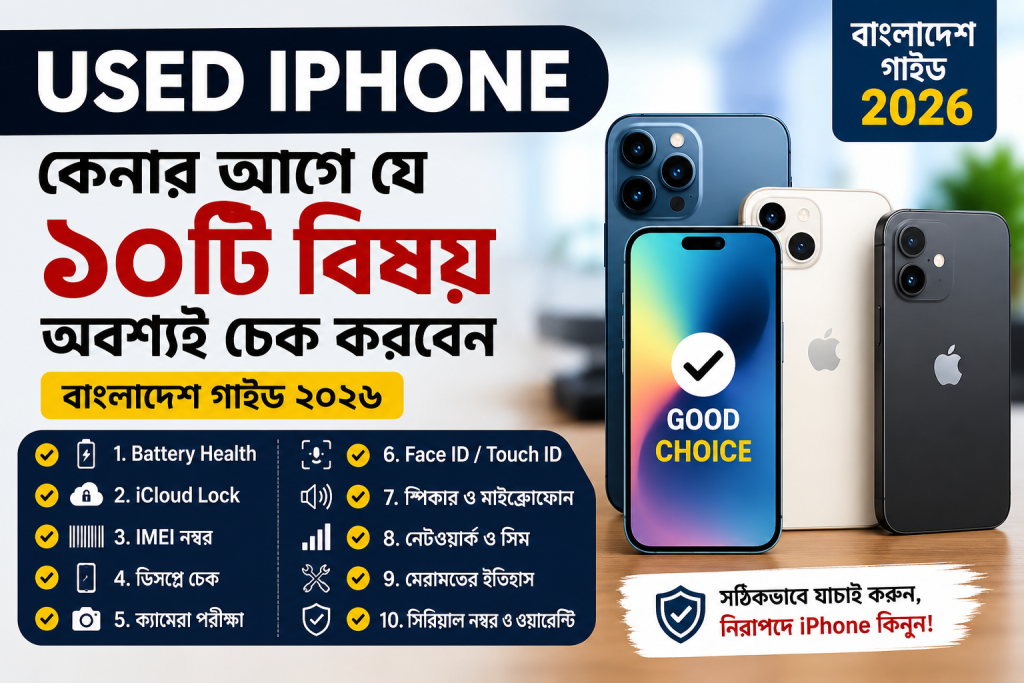
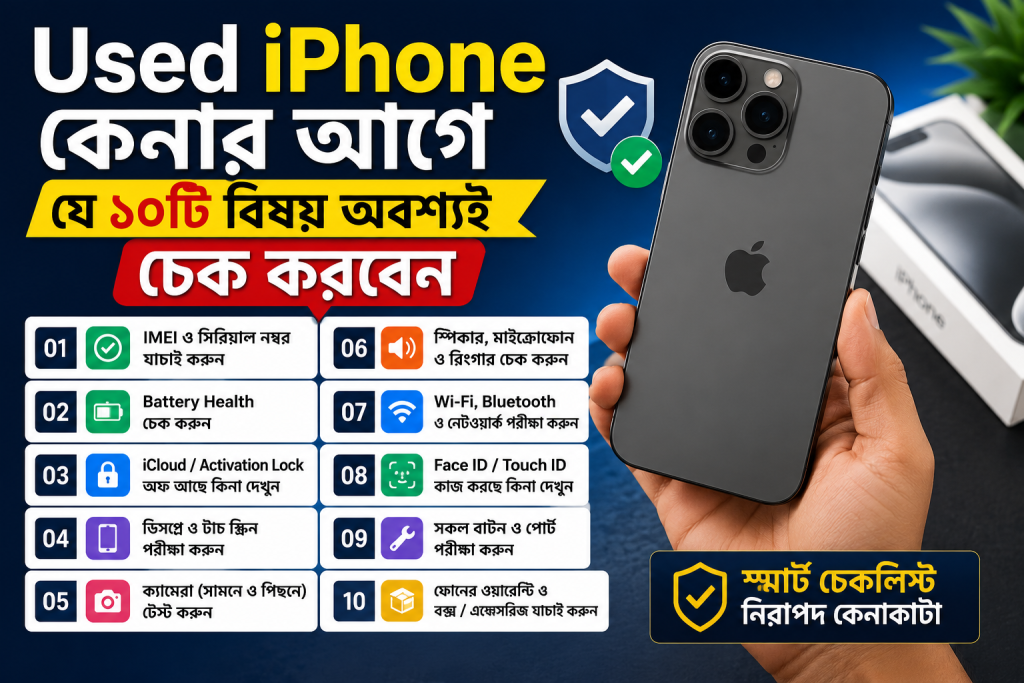
Used iPhone Buying Guide in Bangladesh 2026: How to Avoid Scams
Introduction
Buying a used iPhone in Bangladesh can be an excellent way to experience Apple’s premium smartphone features without spending the amount required for a brand-new device. From the iPhone 11 and iPhone 12 to newer models, the second-hand market offers options for different budgets.

However, buying a pre-owned iPhone also comes with risks. A phone that looks perfect on the outside may have a replaced display, a weak battery, an iCloud Activation Lock, a cloned IMEI, or a history of serious repairs.
Some dishonest sellers may also advertise refurbished devices as original, hide hardware problems, or offer unusually low prices to attract unsuspecting buyers.
So, how can you buy a used iPhone safely in Bangladesh in 2026?
In this comprehensive used iPhone buying guide for Bangladesh, we will explain how to check the IMEI, battery health, display, camera, Face ID, iCloud status, and other important features before paying. We will also discuss common scams, online buying precautions, and practical tips to help you choose the right iPhone.
1. Decide Your Budget Before Buying a Used iPhone
Before searching for a used iPhone, determine your budget and the features you need. The most expensive model is not necessarily the best choice for every user.
For example, someone who primarily uses Facebook, YouTube, WhatsApp, and everyday apps may not need a Pro Max model. On the other hand, content creators may benefit from a newer model with improved cameras and video features.
Consider these factors before choosing a model:
- Performance: Choose a model that comfortably handles your daily applications.
- Camera quality: Consider your needs for photography, selfies, and video recording.
- Battery life: A phone with a worn-out battery may require an additional replacement expense.
- Storage: Check whether 128GB or more is appropriate for your photos, videos, and applications.
- Software support: Research the model’s current iOS compatibility and remaining software support.
- Repair costs: Older models may be cheaper to purchase but can require expensive repairs.
Which used iPhone should you buy?
| User type | What to prioritize |
|---|---|
| Budget-conscious buyer | Overall condition and affordable repair costs |
| Student | Battery life, performance, and storage |
| Photography enthusiast | Camera condition and image quality |
| Content creator | Video recording, storage, and battery performance |
| Long-term user | Newer hardware and expected software support |
Important tip: Do not spend your entire budget on the phone itself. Keep some money available for a protective case, screen protector, or potential battery replacement.
2. Check the iPhone’s IMEI Number
Checking the IMEI is one of the most important steps when purchasing a used iPhone in Bangladesh.
IMEI stands for International Mobile Equipment Identity. It is a unique identification number used to identify a mobile device.
A phone may look genuine but still have an IMEI-related problem. Therefore, verify the device before completing the purchase.
How to check an iPhone IMEI
Follow these steps:
- Open the Phone application.
- Dial
*#06#. - Note the IMEI number displayed on the screen.
- Open Settings and navigate to General > About.
- Compare the displayed IMEI information.
- If the original box or purchase invoice is available, compare those details as well.
Remember that dual-SIM models may have two IMEI numbers. Check both where applicable.
How to verify an iPhone IMEI in Bangladesh
Bangladesh’s official National Equipment Identity Register (NEIR) provides a way to check mobile-device verification status.
You can use the official portal:
NEIR website: https://neir.btrc.gov.bd/
Alternatively, follow the official SMS verification instructions:
- Open your phone’s messaging application.
- Type
KYDfollowed by a space and the 15-digit IMEI number. - Send the message to
16002. - Read the response and follow up with the relevant authority if the status is unclear.
For example, the message format is KYD 123456789012345. This is only an illustrative number, not a real device IMEI.
You can also review the BTRC website for official guidance.
What should you do if the IMEI status is suspicious?
Do not pay until the issue is resolved. If the IMEI is reported as stolen, blocked, cloned, or associated with inconsistent device information, walk away unless the relevant authority confirms that the problem has been properly resolved.
A successful IMEI check is important, but it does not prove that the phone has original components or that every hardware feature works correctly.
3. Check Battery Health Before Buying
Battery health is another major factor when buying a second-hand iPhone.
As a battery ages, its maximum capacity and ability to deliver peak performance can decline. A phone with poor battery health may require more frequent charging or a battery replacement.
How to check iPhone battery health
Follow these steps:
- Open Settings.
- Tap Battery.
- Select Battery Health & Charging, or the equivalent option available on your iOS version.
- Find Maximum Capacity.
- Review any battery-related service messages.
The displayed percentage estimates the battery’s capacity relative to when it was new.
What battery health percentage is good?
| Maximum capacity | General buying advice |
|---|---|
| 90–100% | Generally attractive, but verify battery authenticity and condition |
| 85–89% | Often reasonable for a used device |
| 80–84% | Consider the price and possible future replacement |
| Below 80% | Budget for replacement and negotiate accordingly |
These are practical buying guidelines, not official Apple grading categories. Battery health alone cannot establish whether a battery is genuine or functioning correctly.
Beware of fake battery health claims
Some sellers may claim that a battery is brand-new or original without providing reliable evidence.
To reduce the risk:
- Check the battery information in Settings.
- Look for service messages or warnings.
- Review Parts and Service History when available.
- Ask whether the battery has been replaced and request documentation.
- Test the phone for unexpected shutdowns or unusual heating.
On some models and iOS versions, battery information may be unavailable or limited if a replacement battery cannot be verified. Do not assume that a displayed percentage proves the battery is genuine.
4. Check Whether the iPhone Has an iCloud or Activation Lock
This is one of the most important checks when purchasing a used iPhone.
Activation Lock is an Apple security feature designed to prevent someone else from using a device without the original owner’s authorization.
If a phone remains linked to another person’s Apple Account, you may be unable to activate and use it after resetting the device.
How to check for iCloud Lock
Before paying:
- Ask the seller to back up any personal information they want to keep.
- Ask the seller to sign out of their Apple Account and turn off Find My as required.
- Have the seller erase the device in front of you.
- Connect the iPhone to Wi-Fi and proceed through the initial setup.
- Confirm that the device activates without requesting the previous owner’s Apple Account credentials.
If the screen displays iPhone Locked to Owner, do not purchase the device.
Do not accept promises that the seller will remove the lock later. The original owner should resolve the issue before the sale.
Apple provides additional guidance in its official article: If you want to buy a pre-owned iPhone.
Check for organization management
Some devices previously used by businesses or educational institutions may be managed remotely.
After setup, check Settings > General > VPN & Device Management, where available. Look for unexpected management profiles or restrictions.
If the device appears to be managed by an organization, ask the seller to have it properly released before purchasing.
5. Check Whether the iPhone Has Original Parts
A used iPhone can have a replaced display, battery, camera, or other component.
Replacement parts are not automatically a problem. A properly repaired device can still be a good purchase. The important questions are whether the repair was disclosed, whether the parts are suitable, and whether the device works correctly.
How to check Parts and Service History
On supported models and software versions:
- Open Settings.
- Select General.
- Tap About.
- Look for Parts and Service History.
Depending on the model and repair, you may see information about the battery, display, camera, or other components.
Common labels include:
- Genuine: The part was serviced using genuine Apple parts and processes.
- Used: A previously used genuine Apple part was installed, where supported.
- Unknown: The part may be nongenuine, unverified, incorrectly installed, or not functioning as expected.
- Unverified: In applicable cases, this can indicate an unverified logic-board replacement.
The labels and information available vary by model and iOS version. The absence of a Parts and Service History section does not guarantee that a phone has never been repaired.
For more details, see Apple’s official Parts and Service History guide.
How to inspect the display
Open a plain white screen, a black screen, and several colorful images. Look for:
- Dead pixels or colored spots.
- Yellow patches or uneven brightness.
- Flickering or unusual discoloration.
- Touchscreen areas that do not respond.
- Cracks, lifted edges, or signs of poor installation.
If supported, check whether True Tone is available under Settings > Display & Brightness. Missing True Tone can be a clue that the display was replaced or that a component is not functioning as expected, but it is not conclusive proof by itself.
Also check Face ID or Touch ID, depending on the model. A phone with a faulty biometric system may be expensive to repair.
6. Test the Camera, Speaker, Microphone, and Buttons
Never purchase a used iPhone based only on its appearance.
A phone can have a clean body but suffer from hidden hardware problems. Spend at least 10–15 minutes testing the important features.
Camera test
Open the Camera application and test:
- Front and rear cameras.
- Available zoom levels.
- Autofocus and image sharpness.
- Flash.
- Portrait mode, where supported.
- Video recording and playback.
Look for blurry images, persistent spots, unusual vibration, or focusing problems.
Speaker and microphone test
Play a video or music at different volume levels. Make a short voice recording and play it back. If possible, make a test call and check both the earpiece and microphone.
Button and charging test
Test the following:
- Power or side button.
- Volume buttons.
- Ring/Silent switch or Action button, depending on the model.
- Charging port and cable connection.
- Wireless charging, if supported.
- Haptic feedback.
Connectivity test
Insert your own SIM card and verify that the phone can make and receive calls. Test mobile data, Wi-Fi, and Bluetooth.
A seller who refuses reasonable testing should be treated with caution.
7. Inspect the Body for Physical or Water Damage
Carefully examine the phone under good lighting.
Remove the protective case if the seller permits it, then inspect the frame, screen, back glass, and charging port.
Look for:
- Deep scratches and dents.
- Cracks in the front or rear glass.
- Gaps between the screen and frame.
- Bent edges or uneven seams.
- Corrosion or unusual residue around the charging port.
- Signs of poor-quality repairs.
Water resistance can deteriorate with age, damage, and repairs. Do not assume a used iPhone is still water-resistant simply because its model was originally designed with a water-resistance rating.
Avoid deliberately exposing the phone to water as a test.
If you suspect liquid damage, have the device examined by a qualified technician before buying.
8. Check the Model Number, Storage, and Network Lock
Before agreeing on the price, confirm that the seller is offering the exact model advertised.
Go to Settings > General > About and review the model name, model number, storage information, and other available details.
Make sure the storage capacity matches the listing. For example, a 128GB model should not be advertised as a 256GB device.
Also check the Network Provider Lock entry. On supported versions of iOS, No SIM restrictions indicates that the device is not locked to a particular carrier.
If the phone is carrier-locked, ask the seller to explain the restriction and verify that it can be legitimately unlocked before buying.
Be cautious if the seller claims that a device is a particular regional variant but refuses to provide its model information.
9. Compare Used iPhone Prices in Bangladesh
Price is one of the biggest considerations for buyers in Bangladesh.
The price of a used iPhone depends on several factors:
- Model and storage capacity.
- Physical condition.
- Battery health.
- Repair history.
- Network and regulatory status.
- Included accessories.
- Seller reputation.
- Warranty or return policy.
Rather than relying on one advertised price, compare several current listings for the same model and storage capacity.
How to spot a suspiciously cheap iPhone
Suppose several sellers are advertising a particular model at similar prices, but one seller offers it for dramatically less.
Before considering the offer, ask why it is cheaper. The device may have a damaged display, a weak battery, a carrier lock, an undisclosed repair, or another issue.
A low price does not automatically mean fraud, but it is a reason to investigate carefully.
Calculate the actual cost
Before buying, estimate the total cost:
Total estimated cost = Purchase price + Expected repair cost + Necessary accessories
For example, if a phone costs ৳35,000 and needs a battery replacement costing ৳5,000, your estimated total is ৳40,000 before accessories or other repairs.
These amounts are illustrative only, not current market quotations.
If a better-maintained device costs only slightly more, paying the difference may be the wiser decision.
10. Common Used iPhone Scams in Bangladesh
Understanding common scams can help you avoid losing money.
Scam 1: Refurbished phone sold as original
Some sellers may describe a refurbished or rebuilt device as untouched or factory-original.
How to avoid it: Inspect Parts and Service History, examine the device carefully, and ask directly about repairs. If the phone’s history cannot be established, price it according to its verified condition rather than the seller’s claims.
Scam 2: Fake battery health claims
A seller may claim that a battery is new or has excellent health without reliable evidence.
How to avoid it: Check battery information in Settings, review service messages, and have a qualified technician inspect the device if the information is inconsistent.
Scam 3: iCloud-locked iPhone
A locked device may appear functional before being reset, but it can become unusable for the new owner during activation.
How to avoid it: Have the seller erase the phone and complete activation before payment. Never accept an Activation-Locked device.
Scam 4: IMEI-related problems
A device may have an IMEI that is reported, blocked, cloned, or inconsistent with its claimed identity.
How to avoid it: Check every applicable IMEI through official NEIR channels and compare the device information. Do not rely exclusively on a screenshot provided by the seller.
Scam 5: Advance payment fraud
A seller may demand an advance payment to reserve a phone, then disappear or stop responding.
How to avoid it: Avoid sending money to unknown sellers before verifying the device. If you cannot inspect it in person, use a trustworthy transaction method with clearly explained buyer protection.
Scam 6: Bait-and-switch offers
A listing may advertise a well-maintained Pro or Pro Max model, but the seller may try to substitute a different model or a damaged device during the meeting.
How to avoid it: Verify the model, storage, condition, and agreed price before paying. Keep a copy of the listing and written communication.
Scam 7: Fake accessories
Some sellers include counterfeit chargers, cables, or other accessories while claiming they are genuine Apple products.
How to avoid it: Ask what is included and whether the accessories are original. Never assume that an iPhone is genuine or well-maintained merely because its box and accessories look authentic.
11. Is It Safe to Buy a Used iPhone Online?
Buying online can be convenient, but it requires additional precautions.
Before placing an order:
- Check the seller’s history and independent reviews.
- Request clear photographs and a recent video showing the actual device.
- Ask for the IMEI and model details, then verify them independently.
- Request information about battery health and previous repairs.
- Confirm the return policy in writing.
- Ask whether inspection is possible before final payment.
- Avoid sellers who pressure you to pay immediately.
A photograph or video cannot prove that the phone is fully functional. It may also be old, edited, or taken from another listing.
If you must buy remotely, choose a seller that provides a verifiable business identity, a documented invoice, and a clear inspection or return process.
Do not share your Apple Account password, device passcode, banking PIN, or verification codes with a seller.
12. What Should You Ask the Seller Before Buying?
Asking a few direct questions can reveal important information about the device.
Here are some useful questions:
- How long have you used this iPhone?
- Why are you selling it?
- Has the display, battery, camera, or any other component been replaced?
- Has the phone ever suffered liquid damage or required major repairs?
- Is Face ID or Touch ID working correctly?
- Is the device free from iCloud Activation Lock?
- Is it unlocked for use with local SIM cards?
- Can I check its IMEI and test every major feature?
- Can you provide the purchase receipt, if available?
- Do you provide a written receipt and any inspection or replacement period?
You do not have to reject every phone that has been repaired. Instead, make sure the repair history is disclosed, the device works properly, and the price reflects its condition.
13. A Practical Checklist Before Paying
Use this checklist when inspecting a used iPhone in person.
- Confirm the exact model and storage capacity.
- Check the IMEI using official verification channels.
- Confirm the IMEI information matches the device.
- Check battery health and relevant battery messages.
- Review Parts and Service History, where available.
- Inspect the screen for dead pixels, discoloration, and touch issues.
- Test the front and rear cameras.
- Test Face ID or Touch ID.
- Test speakers, microphones, and buttons.
- Test charging and connectivity.
- Insert your SIM card and make a test call.
- Inspect the frame, screen, and back glass.
- Check for unexpected management restrictions.
- Ask the seller to remove their Apple Account and erase the device.
- Complete activation and verify that Activation Lock is absent.
- Agree on the final price and any return conditions.
- Obtain a written receipt containing the model, IMEI, price, date, and seller details.
Golden rule: Never pay in full before completing the essential checks. If the seller refuses to let you verify the phone, choose another device.
14. Where Should You Buy a Used iPhone in Bangladesh?
You can find second-hand iPhones through established mobile retailers, specialist used-phone shops, online marketplaces, and individual sellers.
Each option has advantages and risks.
Established retailers: These may offer a written invoice, a defined inspection process, or a limited warranty. Confirm exactly what is covered and whether the warranty applies to used devices.
Online marketplaces: These provide a wide selection, but listings can vary significantly in reliability. Verify the actual device rather than relying on the seller’s profile or photographs.
Individual sellers: You may find a competitive price, but you should take responsibility for checking the device and documenting the transaction.
Wherever you buy, prefer a seller who permits proper testing, answers questions clearly, and provides written purchase details.
Do not assume that a device is genuine, original, or legally registered simply because a seller operates from a physical shop.
15. Final Verdict: Should You Buy a Used iPhone in 2026?
Buying a used iPhone in Bangladesh in 2026 can be a smart decision if you choose carefully.
A well-maintained device can provide a premium camera experience, smooth everyday performance, and access to Apple’s ecosystem at a lower purchase price than a new model.
However, the lowest-priced iPhone is not necessarily the best deal. A phone with an Activation Lock, a problematic IMEI, a defective display, or a failing battery can cost much more than expected.
Before buying, prioritize these five checks:
- IMEI verification: Check the device through official Bangladesh verification channels.
- Battery health: Review battery capacity and any relevant service warnings.
- Activation Lock: Ensure the seller removes their account and the device activates successfully.
- Hardware condition: Test the display, cameras, biometric features, speakers, and charging.
- Seller reliability: Obtain a written receipt and agree on the return terms before payment.
Take your time, compare several devices, and do not let a seller pressure you into a rushed decision.
A careful inspection today can save you from expensive repairs and scams tomorrow.
Frequently Asked Questions (FAQs)
1. Is it safe to buy a used iPhone in Bangladesh in 2026?
Yes, it can be safe if you buy from a reliable seller and verify the IMEI, Activation Lock status, battery health, hardware condition, and repair history before payment.
2. How do I check whether a used iPhone is original?
Check the model information in Settings, inspect Parts and Service History where available, test the device thoroughly, and verify the IMEI through official channels. No single check proves that every component is original.
3. How do I check an iPhone IMEI in Bangladesh?
Find the IMEI by dialing *#06#. You can then use the official NEIR portal at https://neir.btrc.gov.bd/ or follow the official KYD SMS verification procedure to 16002.
4. What battery health is good for a used iPhone?
As a practical guideline, 85% or higher is often a reasonable starting point. However, battery health should be considered alongside the phone’s age, price, service history, and actual performance.
5. Should I buy an iPhone with a replaced display?
It depends on the quality of the replacement, the phone’s functionality, and the price. Check Parts and Service History, test touch responsiveness and display quality, and make sure Face ID works. Avoid devices with unexplained warnings or poorly installed parts.
6. Can I use an iCloud-locked iPhone?
You should not purchase an iPhone that remains Activation Locked to someone else’s Apple Account. Ask the original owner to remove the lock before the sale.
7. Is a refurbished iPhone the same as a used iPhone?
No. A used iPhone may simply have been owned previously, while a refurbished iPhone has undergone some form of inspection, repair, or restoration. The quality and standards of refurbishment vary by seller, so verify what work was performed and what warranty is provided.
8. Should I buy a used iPhone without a box?
A missing box does not automatically mean the phone is fake or stolen. However, you should carefully verify the IMEI, inspect the device, and obtain a written purchase receipt. The seller should be able to explain the device’s history.
9. How can I avoid used iPhone scams online?
Verify the seller, inspect the actual device, avoid suspicious advance-payment requests, confirm the return policy, and never share sensitive account credentials. Prefer documented transactions with a clear process for resolving problems.
10. Is it better to buy an older Pro model or a newer standard iPhone?
It depends on your needs. An older Pro model may offer additional camera features and a high-refresh-rate display, depending on the models being compared. A newer standard model may offer a newer processor and a longer expected period of software support. Compare the specific models, condition, and total cost before deciding.
Disclaimer: Prices, availability, device-registration procedures, and software features may change. Verify current information through official sources and inspect the individual device before purchasing.