Motorola Razr 60 Ultra Review: Specs, Camera and Battery Life
Introduction
The Motorola Razr 60 Ultra is a premium foldable smartphone designed for people who want flagship-level performance in a stylish, compact device. Released in 2025, it combines a large foldable display, a useful external screen, powerful Qualcomm hardware, and a camera system built around three 50MP cameras.
Unlike conventional smartphones, the Razr 60 Ultra folds in half, making it easier to carry in a pocket or small bag. When closed, its external display allows users to check notifications, reply to messages, control music, and take photos without opening the phone.
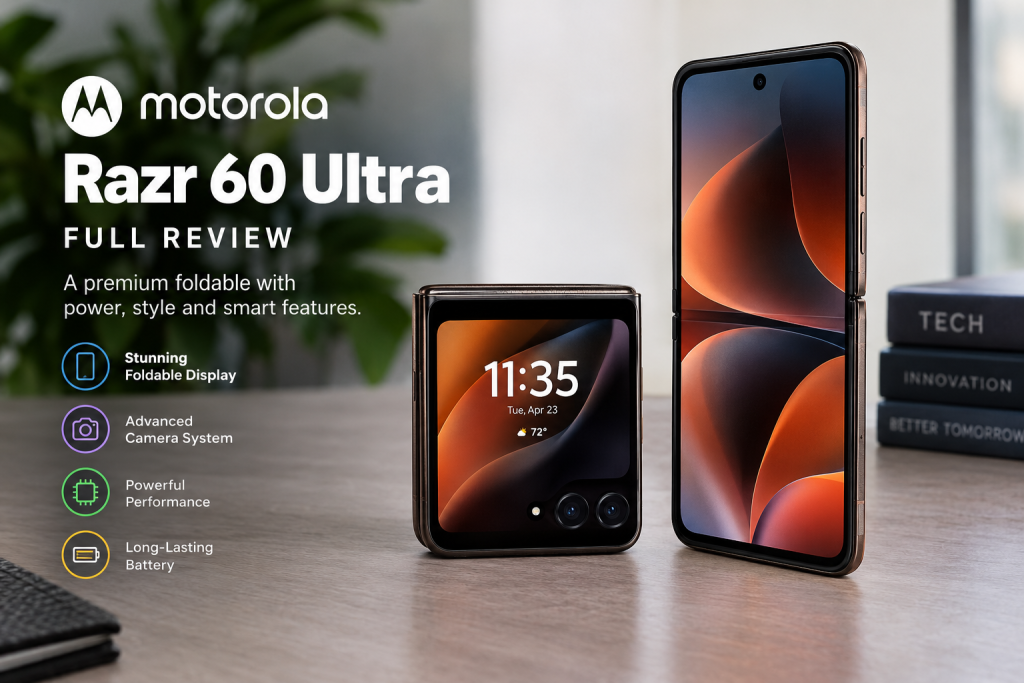
Motorola has also focused on performance and charging speed. The device features the Snapdragon 8 Elite processor, 16GB of RAM, 512GB of internal storage in the listed configuration, and a 4,700mAh battery.
However, premium hardware does not automatically make a phone the right choice for everyone. Foldable phones involve trade-offs, including higher purchase prices, a flexible inner display, and potential long-term repair costs.
In this Motorola Razr 60 Ultra review, we examine its specifications, design, performance, cameras, battery, software, and competition to help you decide whether it deserves a place on your shortlist.
Quick Verdict: Is the Motorola Razr 60 Ultra Worth Buying?
The Motorola Razr 60 Ultra is a compelling option for buyers who want a premium flip-style foldable phone without sacrificing flagship-class processing power.
Its biggest attractions are the Snapdragon 8 Elite chipset, two high-refresh-rate displays, fast wired and wireless charging, and a versatile cover screen. The compact folding design also makes it different from traditional slab smartphones.
Nevertheless, the price can be difficult to justify if you primarily want the best camera zoom, maximum durability, or the longest possible software support.
Our verdict: The Motorola Razr 60 Ultra is worth considering if you value portability, distinctive design, strong performance, and the flexibility of a large external screen. Before buying, compare its price with the Samsung Galaxy Z Flip7 and check Motorola’s remaining software support for your region.
Key strengths
- Premium flip-style foldable design.
- Powerful Snapdragon 8 Elite processor.
- Large, high-resolution inner display.
- Useful 4-inch external display.
- Three 50MP cameras, including an ultrawide camera.
- 68W wired and 30W wireless charging support.
Key weaknesses
- Premium pricing compared with conventional flagship phones.
- Limited dust protection compared with some conventional smartphones.
- No dedicated telephoto camera.
- The folding display requires more careful handling.
- Software update support is shorter than Samsung’s published seven-year policy for the Galaxy Z Flip7.
Motorola Razr 60 Ultra Key Specifications
The following specifications are based primarily on Motorola’s published device information. Memory configurations, connectivity, colors, and certain features may vary by country.
| Specification | Details |
|---|---|
| Product name | Motorola Razr 60 Ultra |
| Launch year | 2025 |
| Form factor | Flip-style foldable smartphone |
| Operating system at launch | Android 15 |
| Processor | Qualcomm Snapdragon 8 Elite |
| Manufacturing process | 3nm |
| RAM | 16GB LPDDR5X |
| Internal storage | 512GB UFS 4.0 in the listed configuration |
| Expandable storage | No microSD card slot |
| Main display | Approximately 7.0-inch LTPO foldable AMOLED |
| Main display resolution | 2992 × 1224 pixels |
| Main display refresh rate | Up to 165Hz |
| External display | 4.0-inch pOLED |
| External display resolution | 1272 × 1080 pixels |
| External refresh rate | Up to 165Hz |
| Rear cameras | 50MP main + 50MP ultrawide |
| Front camera | 50MP |
| Battery capacity | 4,700mAh |
| Wired charging | Up to 68W TurboPower |
| Wireless charging | Up to 30W |
| Reverse charging | 5W |
| Water and dust resistance | IP48 |
| Connectivity | 5G, Wi-Fi, Bluetooth 5.4, NFC |
| USB port | USB-C, USB 2.0 |
| Weight | Approximately 199g |
| SIM | Physical SIM and eSIM, depending on market |
| Fingerprint sensor | Side-mounted |
| Stereo speakers | Yes, with Dolby Atmos support |
Specification note: The processor, display resolutions, charging ratings, and other details above reflect Motorola’s published specifications. Actual charging speeds depend on the compatible charger and operating conditions. Confirm the exact model number, supported network bands, SIM configuration, and included accessories with your regional retailer.
Official reference: Motorola Razr 60 Ultra specifications.
Design and Build Quality
Appearance and Materials
The Motorola Razr 60 Ultra takes a different approach from conventional smartphones. Its clamshell design folds vertically, reducing its height when closed while providing a large screen when opened.
The external display covers much of the upper half of the closed device. This design gives the phone a distinctive appearance and makes the cover screen useful for everyday tasks rather than treating it as a small notification panel.
Motorola has offered finishes that include Alcantara-inspired material, FSC-certified wood on selected variants, and other textured or leather-inspired finishes. Color and material availability depend on the market and specific edition.
These options make the Razr 60 Ultra appealing to buyers who want a smartphone that looks and feels different from the usual glass-and-metal designs.
Durability and Ergonomics
The phone weighs approximately 199g. Its closed dimensions are around 73.99 × 88.12 × 15.69mm, while the open device measures approximately 73.99 × 171.48 × 7.19mm.
When folded, it is short enough to fit comfortably into many pockets. However, its thickness is greater than that of a conventional smartphone, particularly when stored in tight trousers or small compartments.
The IP48 rating provides protection against certain solid particles and water exposure under specified test conditions. It should not be interpreted as complete dustproofing or a guarantee against water damage.
Because it uses a folding display and hinge, buyers should take additional care around fine dust, sand, sharp objects, and excessive pressure on the inner screen.
Practical advice: Use the phone as intended, avoid pressing hard on the folding display, and follow Motorola’s cleaning and handling instructions. A protective case can help reduce damage from everyday knocks, although it cannot eliminate the risks associated with foldable hardware.
Features: What Makes the Razr 60 Ultra Different?
1. A Large and Functional External Display
One of the most useful features is the 4-inch pOLED cover display.
It can handle supported applications and everyday interactions without requiring users to open the phone every time they receive a notification.
Practical uses include:
- Checking messages while walking.
- Controlling music during a commute.
- Viewing navigation information.
- Taking selfies using the rear cameras.
- Checking calendar reminders.
- Handling quick tasks when only one hand is available.
Application compatibility and available controls can depend on Motorola’s software version and regional configuration.
2. Flagship-Class Processing Power
The Snapdragon 8 Elite is a high-end mobile processor designed for demanding smartphone workloads.
Combined with 16GB of RAM, it gives the Razr 60 Ultra the hardware foundation for fast app launches, multitasking, advanced mobile photography, and graphics-intensive games.
This is a meaningful advantage over foldables that use midrange or less powerful flagship processors.
3. Flexible Photography Options
The dual rear camera system combines a 50MP main camera with a 50MP ultrawide camera.
The external display makes it possible to frame selfies with the rear cameras, potentially improving detail compared with using a conventional front-facing camera.
The phone also supports hands-free shooting in suitable positions, making it useful for group photos, video calls, and casual content creation.
4. Fast Charging Options
Motorola lists support for up to 68W wired charging and up to 30W wireless charging.
These ratings give users flexibility: wired charging is useful when they need to replenish the battery quickly, while wireless charging is convenient at a desk or bedside.
The maximum advertised speeds require compatible equipment and suitable conditions. Charging times are not guaranteed to remain constant throughout the charging cycle.
5. Premium Audio and Connectivity
The phone includes stereo speakers with Dolby Atmos support, Bluetooth 5.4, NFC, and modern Wi-Fi connectivity.
These features are useful for streaming, wireless headphones, contactless payments where supported, and everyday connectivity.
The absence of a 3.5mm headphone jack means wired headphones generally need a USB-C connection or a suitable adapter.
Performance Review
Everyday Usage
For everyday activities, the Snapdragon 8 Elite and 16GB of RAM provide a strong hardware platform.
Tasks such as browsing, video streaming, email, social media, messaging, and switching between multiple applications are well within the intended capabilities of this device.
The high-refresh-rate displays also contribute to a responsive user experience. Scrolling, animations, and compatible games can look smooth when the phone is operating at higher refresh rates.
Actual smoothness still depends on the application, software settings, temperature, and background activity.
Multitasking Performance
The generous RAM allocation should be helpful for users who regularly switch between communication, productivity, photography, and entertainment applications.
For example, someone working on a document while checking email and responding to messages should have substantial memory resources available.
However, RAM capacity alone does not guarantee that every application will remain open indefinitely. Android may still manage background applications according to available resources and power settings.
The external display also adds a practical multitasking advantage by making selected activities accessible without fully opening the device.
Gaming and Professional Workloads
The Snapdragon 8 Elite provides flagship-level graphics and processing capabilities, making the Razr 60 Ultra suitable for demanding mobile games, photo editing, and other intensive applications.
Its large inner display is particularly useful for games that benefit from more screen space.
There are some considerations, however.
- Heat: Demanding games can generate heat, potentially reducing sustained performance.
- Battery consumption: High refresh rates and graphics-intensive applications can use significant power.
- Comfort: The phone’s folding design may not be as convenient as a conventional gaming phone during long sessions.
- Sustained performance: Results vary by game, ambient temperature, and software version.
No benchmark score is necessary to establish that the phone uses a flagship processor. For buyers who care about sustained gaming performance, independent tests of the exact retail model are more useful than theoretical chipset performance alone.
Display Quality
Main Display: Large, Detailed and Smooth
The Motorola Razr 60 Ultra has an approximately 7-inch foldable LTPO AMOLED display with a resolution of 2992 × 1224 pixels.
Its large viewing area is suitable for watching videos, reading articles, viewing photographs, editing documents, and running compatible applications.
The advertised refresh rate reaches 165Hz. This can provide smoother scrolling and animations than a conventional 60Hz screen, although the benefit depends on the content and application.
The display also supports HDR formats, including HDR10+ and Dolby Vision according to Motorola’s published specifications.
External Display: More Than a Notification Screen
The 4-inch external pOLED display has a resolution of 1272 × 1080 pixels.
Its relatively generous size is useful for checking messages, framing photos, and interacting with supported applications. Users who prefer completing small tasks quickly may find this more convenient than opening the device for every interaction.
The cover display also supports a refresh rate of up to 165Hz, although actual operation depends on settings and content.
Brightness and Color Accuracy
Motorola advertises peak brightness of up to 4,500 nits for the inner display and up to 3,000 nits for the external display.
These are peak specifications, not guaranteed brightness levels across the entire screen or during every activity. Independent testing is needed to determine sustained outdoor brightness and reflectivity under real conditions.
The displays support a wide color gamut and 10-bit color according to the published specifications. This can help produce rich colors and smooth tonal transitions.
However, color accuracy is different from color richness. Buyers who edit photographs professionally should look for independent measurements of color accuracy and available display calibration modes.
What About the Screen Crease?
Like other foldable phones, the Razr 60 Ultra has a flexible inner display that folds along a hinge.
The crease can be visible or noticeable depending on lighting, viewing angle, and touch position. Its impact on daily use is subjective, so buyers who are sensitive to display imperfections should try the phone in person before purchasing.
Camera Performance
The Motorola Razr 60 Ultra uses three 50MP cameras: a main rear camera, an ultrawide rear camera, and a front-facing camera.
This configuration offers flexibility, although megapixel counts alone cannot establish image quality. Sensor size, lens design, image processing, stabilization, and lighting all affect the final result.
Daylight Photography
In good lighting, the main camera is designed to capture detailed images suitable for everyday photography, travel, portraits, and social media.
The ultrawide camera provides a wider field of view for landscapes, architecture, interiors, and group photographs.
The external display is particularly useful when taking selfies with the rear camera system. It lets users compose a shot while benefiting from the rear cameras’ hardware.
For best results, users should:
- Clean the camera lenses before shooting.
- Use the main camera for general-purpose photographs.
- Switch to ultrawide mode when the scene needs a wider perspective.
- Avoid digital zoom when maintaining fine detail is important.
- Review exposure and focus before capturing important moments.
Actual image detail, dynamic range, and color reproduction should be judged using independent sample photographs rather than megapixel counts alone.
Low-Light Photography
Low-light performance is more demanding because cameras receive less light and may need to increase exposure time or apply additional processing.
The main camera is generally the preferred starting point for nighttime scenes. The ultrawide camera may show more visible noise or reduced detail in difficult lighting, depending on the scene.
Night mode can help brighten photographs and control noise, but it cannot completely compensate for limited light or movement.
For moving subjects, such as children or pets, users should expect results to vary more than when photographing stationary buildings or landscapes.
A dedicated telephoto camera is absent, so the phone is not as versatile as some traditional flagship phones for distant subjects.
Video Recording
The camera system is designed for everyday video recording, short-form social media clips, and casual content creation.
The external screen can also help users frame themselves when recording with the rear cameras.
Before buying, check the exact regional specification sheet for supported video resolutions, frame rates, stabilization modes, and any limitations that apply to individual cameras.
For professional content production, test autofocus, audio quality, stabilization, exposure transitions, and low-light footage before relying on the phone as a primary camera.
Camera verdict: The three 50MP cameras and practical cover screen make the Razr 60 Ultra an interesting option for casual creators and selfie enthusiasts. Buyers who require optical zoom or consistently predictable results in difficult lighting may prefer a conventional camera-focused flagship.
Battery Life and Charging
Battery Capacity
The Motorola Razr 60 Ultra has a 4,700mAh battery.
That is a substantial capacity for a flip-style foldable, and it provides a reasonable foundation for daily use. However, battery endurance depends on how the phone is used.
Video streaming, gaming, camera recording, mobile data, outdoor brightness, and frequent use of the 165Hz display can all affect power consumption.
A person who mainly messages, browses, and takes occasional photographs may have a very different experience from someone who plays games and records video for hours.
There is no single battery-life figure that applies to every user. Independent tests using consistent brightness and usage conditions are the best way to compare endurance between phones.
Charging Performance
The phone supports:
- Up to 68W wired charging.
- Up to 30W wireless charging.
- Up to 5W reverse charging.
The maximum wired charging rate requires a compatible Motorola TurboPower charger. A charger that uses a different charging standard may deliver a lower speed.
Wireless charging is convenient for users who have compatible charging pads at home or work. Reverse charging may help power a compatible small accessory in an emergency, although its output is limited.
Is the Battery Good Enough for a Full Day?
It may be sufficient for many users, but a full day of use cannot be guaranteed without considering individual habits.
If you travel frequently, spend long hours away from a charger, or play graphics-intensive games, compare independent battery tests and consider carrying a compatible power bank.
Buyers should also check whether a charger is included with the phone in their country, as retail packaging and accessories can differ.
Software and User Experience
Android 15 at Launch
The Motorola Razr 60 Ultra launched with Android 15 and Motorola’s software features for foldable devices.
Its software experience combines Android’s familiar interface with controls designed for the external screen, flexible positioning, and quick access to selected applications.
The cover screen is central to the experience. When the available software supports a particular task, users can interact with it while keeping the phone closed.
Motorola’s software also includes customization features and security tools. Availability and functionality may change with system updates and regional versions.
AI and Smart Features
The Razr 60 Ultra includes Motorola’s AI-focused features, with availability depending on the software version, supported languages, region, and any required online services.
Before purchasing, verify which AI features are actually available in your country and whether they require an account, internet connection, or separate service terms.
It is sensible to treat AI functions as an additional benefit rather than the sole reason to buy the device.
Software Updates and Long-Term Support
Software support deserves special attention on a premium smartphone.
Motorola’s published support information for the Razr 60 Ultra should be checked for the specific region and model. Support dates and policies may differ by market, and security updates do not necessarily follow the same schedule as major Android version upgrades.
Because the phone launched in 2025, buyers in 2026 should confirm:
- Which Android version is currently available for their exact model.
- How many major Android upgrades remain.
- The expected security update end date.
- Whether the device is still receiving regular security patches.
Official reference: Motorola security update information.
If long-term software support is your highest priority, compare the remaining support period with competing devices rather than relying only on the original launch promise.
Pros and Cons of the Motorola Razr 60 Ultra
Pros
- Powerful processor: Snapdragon 8 Elite offers flagship-class computing capability.
- Distinctive folding design: Folds into a more compact shape than a conventional smartphone.
- Large external display: Makes supported tasks easier without opening the phone.
- High-refresh-rate displays: Both screens support refresh rates of up to 165Hz.
- Versatile cameras: Main and ultrawide rear cameras offer different shooting perspectives.
- Fast charging: Up to 68W wired and 30W wireless charging support.
- Generous memory and storage: The listed 16GB RAM and 512GB storage configuration suits demanding users.
- Premium styling: Material and color options provide a distinctive look.
Cons
- High purchase price: Premium foldables can cost more than similarly powerful conventional phones.
- No telephoto camera: Optical zoom flexibility is limited.
- Limited dust resistance: IP48 protection is not equivalent to a fully dustproof design.
- Folding-screen considerations: The flexible display and hinge require careful handling.
- Repair costs: Screen or hinge damage may be expensive to repair; confirm local warranty terms.
- Regional differences: Storage, colors, network bands, SIM options, and included accessories may vary.
- Software support requires checking: The remaining update period may be shorter than that of some competitors.
Motorola Razr 60 Ultra vs Competitors
The Razr 60 Ultra competes primarily with other premium flip-style foldables. The best alternative depends on whether you prioritize processing power, software longevity, camera versatility, or price.
| Feature | Motorola Razr 60 Ultra | Samsung Galaxy Z Flip7 |
|---|---|---|
| Form factor | Flip-style foldable | Flip-style foldable |
| Main processor | Snapdragon 8 Elite | Samsung Exynos 2500 |
| Main display | Approximately 7.0 inches | Approximately 6.9 inches |
| Main refresh rate | Up to 165Hz | Up to 120Hz |
| External display | 4.0 inches | 4.1 inches |
| RAM | 16GB in the listed configuration | 12GB |
| Rear cameras | 50MP main + 50MP ultrawide | 50MP main + 12MP ultrawide |
| Battery | 4,700mAh | 4,300mAh |
| Wired charging | Up to 68W | Up to 25W |
| Wireless charging | Up to 30W | Up to 15W |
| Published software policy | Verify remaining regional support | Up to seven years of OS and security updates, according to Samsung’s launch policy |
Specifications and software policies should be verified against the exact regional models. The comparison uses the original published configurations and does not account for every software update or later price change.
Motorola Razr 60 Ultra vs Samsung Galaxy Z Flip7
The Samsung Galaxy Z Flip7 is one of the closest alternatives.
Motorola’s advantages include its Snapdragon 8 Elite processor, higher advertised display refresh rate, larger battery capacity, and faster charging ratings. These differences may matter to gamers, heavy users, and people who value fast charging.
Samsung offers a slightly larger external display and a clearly defined seven-year OS and security update policy announced for the Z Flip7.
Choose the Razr 60 Ultra if its performance, screen specifications, and charging features suit your needs. Choose the Galaxy Z Flip7 if long-term software support, Samsung’s ecosystem, and its particular software features matter more.
Motorola Razr 60 Ultra vs Motorola Razr 50 Ultra
The Razr 50 Ultra is an older alternative that may be attractive if available at a substantially lower price.
The Razr 60 Ultra upgrades the hardware to Snapdragon 8 Elite, increases battery capacity to 4,700mAh, and offers 68W wired and 30W wireless charging.
The older model may still be adequate for messaging, browsing, video streaming, and general photography. Its value depends heavily on the current discount, battery condition if used, warranty coverage, and remaining software support.
Compare actual local prices rather than assuming that the newer model is automatically the better purchase.
Should You Choose a Conventional Flagship Instead?
A conventional flagship phone may be a better fit if you do not need a folding design.
Depending on the model, a traditional phone may provide a dedicated telephoto camera, a less complicated display structure, stronger dust protection, or a longer update commitment.
For example, buyers comparing the Razr 60 Ultra with a conventional Samsung Galaxy S-series or Google Pixel flagship should consider camera performance, battery endurance, repair costs, and software support alongside processing power.
The key question is simple: Will you regularly use the folding design and external screen? If not, a conventional flagship may offer better overall value.
Who Should Buy the Motorola Razr 60 Ultra?
Recommended For
1. Users who want a compact premium phone
The folding design makes the phone shorter when closed, which can be useful for commuting and everyday carry.
2. Social media creators
The external screen allows easier selfie framing with the rear cameras. It can be helpful for short videos, group shots, and casual content creation.
3. Power users
The Snapdragon 8 Elite processor and 16GB of RAM provide strong hardware for demanding applications and multitasking.
4. Users who value distinctive design
The foldable form factor and available finishes offer something different from conventional glass-slab smartphones.
5. People who want fast charging
The advertised 68W wired and 30W wireless charging options are useful for buyers who prefer shorter charging sessions and flexible charging methods.
Not Recommended For
1. Buyers on a tight budget
A conventional midrange phone or discounted older flagship may provide better value.
2. Serious optical-zoom photographers
The lack of a dedicated telephoto camera makes it less suitable for people who frequently photograph distant subjects.
3. Users working in dusty environments
IP48 protection does not make the phone dustproof. People regularly exposed to sand, construction dust, or fine particles should consider a device better suited to those conditions.
4. Buyers who want the simplest long-term ownership experience
People who prioritize low repair costs, minimal handling concerns, and straightforward durability may prefer a conventional smartphone.
5. Users who need the longest possible software support
Compare the remaining official update period with competing devices before making a long-term purchase.
Practical Use Cases: How the Razr 60 Ultra Fits Daily Life
Scenario 1: A Busy Professional
Imagine someone who spends the day attending meetings, travelling between offices, and responding to messages.
The external display can help them check notifications and complete supported quick tasks without opening the phone repeatedly. The powerful processor and generous memory also suit productivity applications.
Potential limitation: Users who regularly edit long documents or work with large spreadsheets may prefer a conventional phone with a more familiar screen shape or a larger external monitor setup.
Scenario 2: A Travel Enthusiast
A traveller can use the main display for maps, itineraries, browsing, and viewing photographs. The ultrawide camera can also help capture landscapes and buildings.
The folding design makes the device easier to store in a small pocket or travel bag.
Potential limitation: Frequent navigation, camera use, mobile data, and bright outdoor viewing can drain the battery. IP48 protection should not be treated as protection against beach sand or careless water exposure.
Scenario 3: A Social Media Creator
A creator who produces short videos, selfies, and behind-the-scenes content may appreciate the external screen and the ability to frame shots with the rear cameras.
The large inner display is also useful for editing clips and reviewing photographs.
Potential limitation: Those who need long recording sessions, professional video controls, or optical zoom should evaluate dedicated camera-focused alternatives.
Scenario 4: A Mobile Gamer
The Snapdragon 8 Elite and high-refresh-rate main display provide a strong foundation for gaming.
Users can play compatible titles on the large screen and use the cover display for supported quick interactions between sessions.
Potential limitation: Heat, battery consumption, and sustained performance under heavy loads may affect extended gaming sessions. A conventional gaming phone may offer more suitable ergonomics or dedicated cooling features.
Scenario 5: A Fashion-Conscious Everyday User
Someone who sees a phone as both a practical tool and a personal accessory may appreciate the Razr’s folding design, compact closed form, and distinctive finishes.
Potential limitation: The premium price only makes sense if the design and foldable experience are important enough to justify the extra cost.
Buying Guide: How to Decide if the Motorola Razr 60 Ultra Is Right for You
Step 1: Identify Your Needs
Start by listing the features you use most often.
- For performance and multitasking, the Snapdragon 8 Elite is a strong attraction.
- For selfies and social content, the external screen is particularly useful.
- For photography, consider whether the absence of a telephoto camera matters.
- For travel, weigh portability against battery needs and durability concerns.
- For long-term ownership, check the software support period.
Do not pay extra for a foldable design if you will rarely use its unique features.
Step 2: Set Your Budget
Set a maximum budget that includes more than the phone itself.
Consider the cost of a protective case, a compatible charger if one is not included, insurance, and potential out-of-warranty repairs.
Since premium foldable prices vary considerably by country, compare local retailer offers instead of relying on a price quoted for another market.
Step 3: Compare Alternatives
Shortlist at least two alternatives before making a decision.
The Samsung Galaxy Z Flip7 is the closest direct competitor. The Motorola Razr 50 Ultra may be worth considering if it is significantly cheaper, while a conventional flagship may be more appropriate if camera versatility or long-term support is a priority.
Compare the total package: display quality, camera capabilities, battery performance, software support, warranty, and repair availability.
Step 4: Verify Regional Availability
The Razr 60 Ultra is sold under different regional arrangements, and availability is not identical everywhere.
Before buying, check:
- Whether the phone is officially sold in your country.
- Whether its 5G and 4G bands match your carrier.
- Whether physical SIM and eSIM are supported as you require.
- Whether local warranty and authorized repairs are available.
- Whether the chosen finish and storage configuration are genuine regional models.
If buying an imported handset, confirm whether local service centers will accept it for warranty repairs.
Step 5: Check the Latest Specifications and Pricing
Before completing the purchase, verify the current price, software version, remaining update support, included accessories, and exact model number.
If possible, test the hinge, cover display, fingerprint reader, cameras, speakers, and inner screen in a retail store.
For a used device, inspect the folding display for damage, test the hinge, check charging behavior, and confirm that the phone has not been reported lost or locked to another account.
A small amount of research can prevent an expensive mistake.
Frequently Asked Questions
1. Is the Motorola Razr 60 Ultra worth buying?
Yes, it is worth considering if you want a premium flip-style foldable with a powerful processor, high-refresh-rate displays, versatile cameras, and fast charging. It is less compelling if you prioritize low cost, optical zoom, or the longest possible software support.
2. What are the main advantages of the Motorola Razr 60 Ultra?
Its main advantages include the Snapdragon 8 Elite chipset, 16GB RAM in the listed configuration, large inner and external displays, three 50MP cameras, a 4,700mAh battery, and support for 68W wired and 30W wireless charging.
3. Does the Motorola Razr 60 Ultra support 5G?
Yes. The phone supports 5G, including sub-6GHz bands. Actual compatibility depends on the regional model, supported network bands, carrier, and local network availability.
4. How long does the Motorola Razr 60 Ultra battery last?
Battery life depends on brightness, network conditions, gaming, camera use, and other activities. The phone has a 4,700mAh battery, but a specific number of hours should not be guaranteed without a relevant test using consistent conditions.
5. How fast does the Motorola Razr 60 Ultra charge?
Motorola specifies up to 68W wired charging and up to 30W wireless charging. Maximum speeds require compatible charging equipment and suitable conditions.
6. Is the Motorola Razr 60 Ultra waterproof?
No smartphone should be treated as completely waterproof. The Razr 60 Ultra has an IP48 rating, which provides defined protection under specific test conditions. It is not fully dustproof, and water resistance can diminish with wear or damage.
7. Is the Motorola Razr 60 Ultra good for gaming?
Its Snapdragon 8 Elite processor and high-refresh-rate inner display make it suitable for demanding mobile games. However, sustained performance depends on temperature, the game, and software settings. Heavy gaming can also reduce battery life.
8. Does the Motorola Razr 60 Ultra have a telephoto camera?
No dedicated telephoto camera is listed. Its rear camera system consists of a 50MP main camera and a 50MP ultrawide camera. Digital zoom is available, but it is not equivalent to a dedicated optical telephoto lens.
9. How does the Motorola Razr 60 Ultra compare with the Galaxy Z Flip7?
The Razr 60 Ultra offers a Snapdragon 8 Elite processor, a 165Hz display specification, a 4,700mAh battery, and faster advertised charging. Samsung offers a 4.1-inch cover display and a seven-year OS and security update policy announced for the Galaxy Z Flip7. Your choice depends on price, software support, performance needs, and personal preference.
10. Is the Motorola Razr 60 Ultra available worldwide?
Availability varies by country and retailer. Before purchasing, check official local availability, network compatibility, warranty coverage, and whether the phone is an imported version.
Conclusion: Should You Buy the Motorola Razr 60 Ultra?
The Motorola Razr 60 Ultra demonstrates how far premium flip-style foldables have developed. It combines a distinctive folding design with flagship processing power, two high-refresh-rate displays, a useful external screen, three 50MP cameras, and fast charging.
Its appeal goes beyond appearance. The cover screen can make daily tasks more convenient, while the Snapdragon 8 Elite platform provides substantial performance for demanding applications and gaming.
Nevertheless, the phone has practical limitations. It lacks a dedicated telephoto camera, its IP48 rating does not provide complete dust protection, and the premium price may be difficult to justify for buyers who do not need a folding design. Long-term software support and repair costs also deserve careful consideration.
Final recommendation: The Motorola Razr 60 Ultra is a strong candidate for people who value compact portability, premium design, flagship performance, and a functional cover display. If your priorities are camera zoom, long-term software support, affordability, or uncomplicated durability, compare it carefully with the Samsung Galaxy Z Flip7 and conventional flagship smartphones.
Before buying, check the latest local price, remaining software support, warranty conditions, and exact regional specifications. That approach will help you decide whether the Razr 60 Ultra is the right foldable for your needs rather than simply the most distinctive phone on the shelf.
Sources and Verification
For the most reliable information, consult official manufacturer documentation first:
- Motorola Razr 60 Ultra — Official specifications
- Motorola — Security update information
- Samsung — Official website for Galaxy Z Flip7 specifications and software support details.
Editorial note: This article uses published specifications and a feature-based assessment. It does not claim first-hand testing, laboratory measurements, or independently verified battery endurance. Confirm current prices, regional availability, software support, and model-specific features before publication or purchase.