Huawei Phones Without Google Services: What You Need to Know
Huawei Phones Without Google Services: An Essential Guide
Huawei smartphones have long been known for their premium hardware, impressive cameras, stylish designs, and innovative technology. However, one major difference separates many modern Huawei phones from conventional Android smartphones: the absence of Google Mobile Services (GMS).
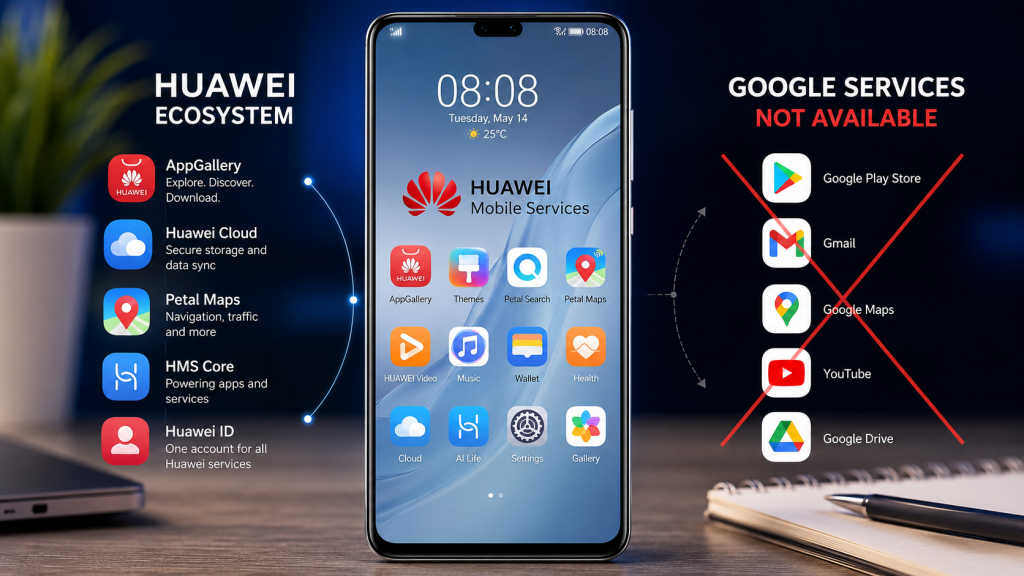
For users accustomed to Android phones from Samsung, Xiaomi, Motorola, OnePlus, or Google, this can initially seem like a major disadvantage. Google Play Store, Gmail, YouTube, Google Maps, Google Drive, Google Photos, and other Google services are deeply integrated into the Android ecosystem.
So, what happens when you buy a Huawei phone without Google services?
The answer is more nuanced than simply saying that Huawei phones “don’t have apps.”
Huawei has developed its own ecosystem based around Huawei Mobile Services (HMS), including AppGallery, Huawei ID, Petal Search, Huawei Cloud, Wallet, Health, and other services. Huawei’s official documentation explains that HMS Core provides services such as Huawei ID, payments, notifications, positioning, maps, in-app purchases, and other capabilities for apps. Huawei also notes that some Android apps requiring Google Mobile Services may not work properly through HMS alone.
That means Huawei phones can still be fully functional smartphones—but the experience is different.
Let’s take a detailed look at everything you should know before buying one.
What Does “Huawei Without Google Services” Actually Mean?
Google Mobile Services is a collection of proprietary Google applications and background services commonly found on certified Android devices.
It includes components such as:
- Google Play Store
- Google Play Services
- Google Maps
- Gmail
- YouTube
- Google Drive
- Google Photos
- Google Sign-In
- Google Wallet and related services
- Google Play Protect
An important distinction is that Google Play Store and Google Play Services are not the same thing.
Google explains that Google Play Services provides core functionality connecting apps with Google services such as Google Sign-In and Google Maps. It also provides security and reliability features on supported certified Android devices.
Huawei phones affected by the Google-services restrictions do not come with the standard Google Mobile Services package.
As a result, you cannot simply open the phone’s settings, sign into a Google account, and expect the Play Store to appear like it does on a typical certified Android smartphone.
Why Don’t Many Huawei Phones Have Google Services?
The situation dates back to U.S. government restrictions affecting Huawei and Google’s ability to provide certain services to new Huawei devices.
Google previously explained that its apps and services were not available for preload or sideload on new Huawei devices subject to those restrictions, and that Google Play Store and related services are available on Play Protect-certified devices.
This created a major change in Huawei’s smartphone strategy.
Instead of relying entirely on Google’s Android ecosystem, Huawei invested heavily in its own mobile-services platform.
That platform is known as:
Huawei Mobile Services (HMS)
HMS is Huawei’s alternative ecosystem for mobile services.
Huawei describes HMS Core as a framework running on the Android Open Source Project that provides services for Huawei devices and developers. These include:
- Huawei ID
- Push notifications
- Payments
- Maps
- Location services
- In-app purchases
- Machine-learning capabilities
- Gaming services
- Cloud services
- AppGallery integration
However, Huawei itself acknowledges that some applications require Google Mobile Services and therefore may not work normally with HMS.
What Is Huawei AppGallery?
If Google Play Store is missing, where do you download applications?
The primary answer is Huawei AppGallery.
Huawei AppGallery is Huawei’s official app distribution platform. It allows users to discover, download, update, and manage applications on compatible Huawei devices.
AppGallery has become an important part of Huawei’s ecosystem.
It offers applications across categories such as:
- Social media
- Communication
- Shopping
- Finance
- Entertainment
- Games
- Productivity
- Travel
- Education
- Photography
- Lifestyle
Huawei also emphasizes app-security measures including developer identity verification, security scanning, and monitoring.
However, AppGallery should not be thought of as an exact one-for-one replacement for Google Play Store.
The available apps vary by:
- Country
- Region
- Device
- Developer support
- App version
- Local regulations
Therefore, you should check whether the apps you use most are supported in your market before purchasing a Huawei phone.
What Is HMS Core?
HMS Core is one of the most important pieces of the Huawei ecosystem.
Think of it as a collection of software services that developers can use to build applications for Huawei devices.
Huawei says HMS Core provides capabilities such as:
- Huawei ID
- In-app payments
- Push notifications
- Location
- Maps
- Games
- Machine learning
- In-app purchases
It can run on the Android Open Source Project and supports Android applications, but Huawei specifically notes that applications dependent on Google Mobile Services may not function properly.
This is one of the most important things prospective Huawei buyers should understand.
Huawei phones can run many Android applications, but Android app compatibility does not automatically mean Google-service compatibility.
Can You Download Android Apps on a Huawei Phone?
Yes—but the process and availability can differ from a conventional Android smartphone.
Huawei provides AppGallery as the primary official app store. It also offers tools such as Petal Search to help users locate applications and other online resources. Huawei’s support pages specifically recommend AppGallery and Petal Search as part of its mobile-services ecosystem.
Some apps may also provide:
- A web version
- A Huawei-compatible version
- Direct APK installation
- A third-party distribution option
- A dedicated alternative service
However, downloading an APK does not automatically solve Google-service dependencies.
For example, an application might install successfully but still fail to:
- Send notifications correctly
- Use Google Maps functionality
- Complete Google Sign-In
- Process Google-based payments
- Access certain Google APIs
- Run background services properly
This is why app compatibility should be evaluated on an app-by-app basis.
Can You Use YouTube on a Huawei Phone?
YouTube is one of the most frequently asked questions.
In many cases, the easiest solution is to use the YouTube website through a browser rather than relying on the standard Google mobile application.
Huawei itself has stated in its support documentation that affected devices do not come with GMS/Google applications and suggests trying web versions of Google applications.
For casual viewing, the browser experience can be perfectly usable.
However, users who depend heavily on the full YouTube Android application may find the experience less convenient than on a Google-certified Android phone.
What About Gmail?
Gmail is another service that requires consideration.
You can generally access Gmail through:
- A web browser
- Other email applications that support standard email protocols
- Alternative email clients
For users who only occasionally check email, this may not be a major issue.
But if Gmail is central to your daily workflow, you should test the exact email solution you plan to use before buying the phone.
What About Google Maps?
Navigation is especially important because Google Maps is deeply integrated with Google services.
Huawei has developed its own mapping and location capabilities, including Petal Maps and related services.
Depending on your country, Petal Maps can provide:
- Navigation
- Route planning
- Location search
- Traffic information
- Public transport information in supported regions
- Walking and driving directions
For many users, this can replace Google Maps for everyday navigation.
However, Google Maps remains deeply embedded in many websites and third-party applications, so there can be situations where the Google experience is more convenient.
What About Google Drive and Google Photos?
Huawei provides its own cloud ecosystem, including Huawei Cloud.
Huawei describes Mobile Cloud as a service for synchronizing information such as photos, videos, and contacts.
This means Huawei users can build a cloud-storage workflow without depending entirely on Google Drive or Google Photos.
Still, if your existing digital life is heavily centered around:
- Google Drive
- Google Photos
- Gmail
- Google Calendar
- Google Docs
- Google Sheets
then moving to Huawei may require some adjustment.
Can You Use WhatsApp on Huawei Phones?
WhatsApp deserves special attention because it is one of the world’s most widely used messaging platforms.
The key point is that WhatsApp availability and functionality can depend on the particular Huawei device, operating environment, app version, and required Google services.
Users should therefore check the current WhatsApp installation method and supported functionality for their specific Huawei model and region before purchasing.
If WhatsApp is essential to your daily communication, don’t assume that every feature will behave exactly like it does on a Google-certified Android phone.
What About Facebook, Instagram, TikTok and Other Social Apps?
Social-media applications can have varying levels of compatibility.
Depending on the application, users may find:
- A native Huawei-compatible version
- An AppGallery listing
- A web version
- APK-based installation
- A third-party distribution method
The important issue is not simply whether an app can be installed.
You should also consider whether:
- Push notifications work
- Login works
- Location services work
- Background operation works
- Google-based authentication works
- In-app purchases work
- Google Maps integration works
An app that installs but lacks essential features is not necessarily a practical solution.
What Happens to Google Sign-In?
Google Sign-In is another potential compatibility problem.
Many applications use Google’s authentication infrastructure to let users sign into an account.
If an app depends on Google Play Services for this functionality, the sign-in process may not work normally on a Huawei device without GMS.
Huawei’s own HMS documentation confirms that some applications requiring GMS may not work properly on HMS.
Therefore, if you use dozens of apps that require Google authentication, moving to Huawei can require more planning.
Is It Possible to Install Google Play Store on Huawei Phones?
This is one of the most common questions.
You will find many websites and videos claiming to offer methods for installing Google services on Huawei phones.
However, this is where users should be careful.
Google’s support community guidance warns that unofficial workarounds can be incomplete, difficult to maintain, unsupported by Google, and potentially create security or reliability problems. It also warns users about obtaining APK files from untrusted sources.
Therefore, installing unofficial Google-service packages should not be treated as an officially supported solution.
There are several potential risks:
1. Security risks
Installing software from unknown sources can expose your device to malicious or modified applications.
2. Compatibility problems
A workaround that functions today may stop working after an operating-system or app update.
3. Banking and payment issues
Some financial applications use security and device-integrity checks that may not behave correctly on modified configurations.
4. Notifications
Even if an application launches, background notifications may not work correctly.
5. Privacy concerns
Installing unofficial frameworks from unknown developers can introduce additional privacy risks.
For these reasons, most users are better off treating unofficial GMS installation as a workaround—not as a guaranteed feature.
Huawei vs Google Android: What’s Different?
Here’s a simple comparison.
| Feature | Huawei Without GMS | Typical Google-Certified Android |
|---|---|---|
| Google Play Store | ❌ Not officially included | ✅ |
| Google Play Services | ❌ | ✅ |
| Huawei AppGallery | ✅ | Optional/available on many devices |
| HMS Core | ✅ | Optional |
| Google Maps | Limited/alternative methods | ✅ |
| YouTube | Web/alternative methods | ✅ |
| Gmail | Web/alternative clients | ✅ |
| Huawei Cloud | ✅ | ❌ |
| Petal Maps | ✅ | ❌ |
| Huawei ID | ✅ | ❌ |
| Google Account ecosystem | Limited | ✅ |
| Android app compatibility | Varies | Generally broad |
| Google-dependent apps | May have limitations | Generally supported |
The most important takeaway is simple:
Huawei phones without Google services aren’t necessarily “bad Android phones.” They are phones that operate within a different mobile-services ecosystem.
Advantages of Huawei Phones Without Google Services
Despite the limitations, Huawei phones have several advantages.
1. Excellent Hardware
Huawei has historically invested heavily in:
- Camera technology
- Displays
- Industrial design
- Battery technology
- Wireless connectivity
- Premium materials
Hardware remains one of Huawei’s strongest selling points.
2. Strong Camera Systems
Huawei’s premium smartphones are particularly known for photography.
Depending on the model, you may get:
- High-resolution main cameras
- Telephoto cameras
- Optical zoom
- Advanced computational photography
- Night photography
- Portrait photography
For photography enthusiasts, this can be a significant reason to consider Huawei.
3. Huawei’s Own Ecosystem
Huawei is no longer simply trying to replicate Google’s ecosystem.
It has developed its own services around:
- Huawei ID
- AppGallery
- Huawei Cloud
- Huawei Health
- Petal Maps
- Wallet
- HMS Core
Huawei’s official mobile-services platform is designed to connect smartphones with other Huawei products and services.
4. Good Hardware-Software Integration
Huawei controls much of its own ecosystem, allowing the company to tightly integrate its software with its hardware.
This can produce a polished experience for users who are comfortable with Huawei’s services.
Disadvantages of Huawei Phones Without Google Services
The biggest disadvantages are related to ecosystem compatibility.
1. No Native Google Play Store
If you are accustomed to downloading everything from Google Play, AppGallery can require an adjustment.
2. Google Apps May Be Inconvenient
Services such as YouTube, Google Maps, Gmail, and Google Drive may require browser-based or alternative solutions.
3. Some Apps Depend on Google Services
Certain Android applications require GMS for authentication, maps, notifications, payments, or other functions.
Huawei itself acknowledges this limitation.
4. Banking and Enterprise Apps Can Be Complicated
Financial and business applications sometimes have strict compatibility and security requirements.
Before purchasing a Huawei phone, check the apps you need for work, banking, authentication, and payments.
5. More Setup May Be Required
A Google-certified Android phone is generally easier for someone who relies heavily on Google’s ecosystem.
Huawei can require more experimentation and alternative apps.
Who Should Buy a Huawei Phone Without Google Services?
Huawei phones can be a good choice for certain types of users.
Huawei may be suitable if you:
- Love smartphone photography
- Prefer Huawei hardware
- Already use Huawei devices
- Don’t rely heavily on Google services
- Are comfortable using browser-based services
- Want Huawei’s ecosystem
- Primarily use social media and standard communication apps
- Are willing to check app compatibility before purchasing
Who Should Avoid Huawei Phones Without Google Services?
A Huawei phone may not be the best choice if you:
- Depend heavily on Google Workspace
- Use Google Maps constantly
- Need the official YouTube app
- Depend on multiple Google-authenticated apps
- Use specialized banking apps
- Need enterprise applications with strict certification requirements
- Want every Android app to work exactly as it does on Samsung or Pixel
For these users, a Google-certified Android phone will usually provide a simpler experience.
Huawei Phones for Users in Bangladesh
For Bangladeshi buyers, app compatibility should be an especially important consideration.
Before buying a Huawei smartphone, check the applications you use every day.
Make a list of:
- bKash
- Nagad
- Banking apps
- Messenger
- YouTube
- Gmail
- Google Maps
- Google Drive
- Microsoft apps
- Ride-sharing apps
- Food-delivery apps
- Shopping applications
- Workplace applications
Don’t assume that because an app is available on Android, it will necessarily behave identically on a Huawei phone without GMS.
The availability of applications can also change over time and vary by market.
Always check the current AppGallery availability and the app developer’s supported installation method before purchasing.
Is Huawei AppGallery Safe?
Huawei positions AppGallery as its official app distribution platform and highlights multiple security mechanisms, including developer identity verification, security scanning, monitoring, and other protective measures.
However, users should still follow basic smartphone-security practices.
Avoid installing applications from random websites simply because an application isn’t immediately available through your preferred store.
When downloading an APK, verify:
- The developer
- The source
- The application name
- The requested permissions
- The version
- Whether the website is legitimate
Google’s support guidance also warns users about APKs obtained from potentially unsafe sources.
Huawei Without Google Services: Is It Still Android?
This question can be confusing.
The answer depends on the specific Huawei device and software environment.
Historically, Huawei devices affected by the restrictions continued to use Android-related technologies while replacing Google’s proprietary mobile services with Huawei’s own services.
Huawei’s HMS documentation specifically describes HMS Core as running on the Android Open Source Project and supporting Android applications.
However, Huawei’s software strategy has also evolved over time, with the company developing its own operating-system ecosystem in different markets.
Therefore, buyers should always check the exact operating system and software platform of the particular Huawei model they are considering.
What Should You Check Before Buying a Huawei Phone?
Don’t buy based solely on specifications.
Use this checklist.
App Checklist
Check whether these apps work:
- Your banking app
- Your payment apps
- Messenger
- YouTube
- Gmail
- Google Maps
- Google Drive
- Microsoft Teams
- Zoom
- Work-related applications
Service Checklist
Check:
- AppGallery availability
- HMS compatibility
- Notification support
- Payment support
- Navigation
- Cloud backup
- Account login
- App updates
Hardware Checklist
Also consider:
- Processor
- RAM
- Storage
- Camera
- Battery
- Charging speed
- Display
- 5G support
- Software-update policy
- Warranty
- Local service availability
Huawei Without Google Services: Common Myths
Myth 1: “Huawei phones cannot install any Android apps.”
False.
Huawei devices can support many Android applications, but compatibility varies and some applications require Google services.
Myth 2: “Every Huawei phone has the same restrictions.”
Not necessarily.
Software platforms, regions, models, and release periods can differ.
Myth 3: “Installing an APK fixes everything.”
False.
Installing an APK only installs the application. It does not automatically provide the Google APIs or services that some apps require.
Myth 4: “Huawei phones are unusable without Google.”
False.
Huawei has built an alternative ecosystem around HMS and AppGallery.
Myth 5: “Every app will work exactly like it does on Samsung.”
False.
Google-dependent applications can behave differently or require alternative solutions.
Tips for a Better Huawei Experience Without Google
If you decide to use a Huawei phone, these tips can make the transition easier.
1. Explore AppGallery First
Before changing phones, search AppGallery for your most important applications.
2. Use Web Apps When Necessary
Many popular services provide excellent mobile websites.
You can add frequently used websites to your home screen for quick access.
3. Use Huawei’s Ecosystem
Instead of trying to recreate every Google service, consider using Huawei’s alternatives.
For example:
Google Maps → Petal Maps
Google Drive/Photos → Huawei Cloud and compatible alternatives
Google Play Store → AppGallery
The goal is to build a workflow that works naturally with the phone.
4. Don’t Install Random APKs
Security should always come first.
If an application isn’t available, look for its official website or developer-supported installation method.
5. Check Updates Regularly
Keep the phone, HMS Core, AppGallery, and applications updated.
Huawei recommends keeping HMS Core updated as newer versions provide expanded functionality and improvements.
Are Huawei Phones Without Google Services Worth Buying in 2026?
The answer depends entirely on your priorities.
If your priority is camera quality, hardware design, battery technology, display quality, and Huawei’s ecosystem, a Huawei phone can still be attractive.
If your priority is seamless access to every Google application and Android app, a Google-certified Android phone is generally the safer choice.
The biggest mistake would be buying a Huawei phone without first checking your app requirements.
For example, someone who primarily uses:
- Camera
- Phone calls
- Messaging
- Browser
- Social media
- Music
- Basic navigation
may have a relatively easy experience.
Someone who depends on:
- Google Workspace
- Google Maps
- Google Drive
- YouTube app
- Google authentication
- Banking applications
- Enterprise apps
may encounter more limitations.
Final Verdict
Huawei phones without Google services are not simply “Android phones with missing apps.” They represent a different approach to the smartphone ecosystem.
Huawei has invested heavily in its own mobile platform, including Huawei Mobile Services, AppGallery, Huawei Cloud, Petal Maps, Huawei ID, and other services. AppGallery is Huawei’s official app distribution platform, while HMS Core provides developers with many of the services necessary to build applications for Huawei devices.
The experience can be excellent if your favorite applications are compatible and you’re comfortable using Huawei’s ecosystem.
But if Google services are an essential part of your daily life, the absence of native GMS can be a significant inconvenience.
The bottom line:
Buy Huawei for its hardware and ecosystem—but only after checking your essential apps.
Before making a purchase, verify your banking applications, messaging apps, work tools, navigation requirements, and Google-dependent services. That five-minute compatibility check can save you from a frustrating smartphone experience later.
Huawei without Google services isn’t necessarily a deal-breaker.
It’s simply a different smartphone experience—and whether it’s right for you depends on how much you rely on Google’s ecosystem.
Frequently Asked Questions (FAQ)
1. Do Huawei phones have Google Play Store?
Huawei phones affected by the Google-services restrictions generally do not come with the official Google Play Store and Google Mobile Services.
2. Can Huawei phones run Android apps?
Many Huawei devices can run Android applications, but compatibility varies. Apps requiring Google Mobile Services may not function correctly.
3. What is Huawei HMS?
HMS stands for Huawei Mobile Services. It provides Huawei’s ecosystem of mobile services and developer capabilities.
4. What is Huawei AppGallery?
AppGallery is Huawei’s official app distribution platform for Huawei devices.
5. Can I use YouTube on Huawei?
You can generally access YouTube through a web browser, while the availability and functionality of native alternatives can vary by device and region.
6. Can I use Gmail on Huawei?
Gmail can be accessed through a web browser or compatible email applications, although the experience may differ from a Google-certified Android phone.
7. Does Huawei have an alternative to Google Maps?
Yes. Huawei offers Petal Maps and other location-related services.
8. Does Huawei have an alternative to Google Drive?
Huawei Cloud provides cloud-storage and synchronization features for supported data and devices.
9. Is Huawei AppGallery safe?
Huawei says AppGallery uses multiple security mechanisms, including developer verification and app-security scanning.
10. Can I install Google Play Services manually?
Unofficial methods exist online, but Google does not officially support these workarounds, and they can introduce compatibility and security risks.
11. Will WhatsApp work on Huawei?
Compatibility can depend on the specific device, software environment, application version, and Google-service requirements. Check the current supported installation method before buying.
12. Is Huawei good for photography?
Huawei’s premium phones have historically placed a strong emphasis on camera hardware and computational photography.
13. Are Huawei phones still worth buying?
Yes, for users who value Huawei hardware and ecosystem and whose essential apps are compatible.
14. Should heavy Google users buy Huawei?
Usually not. If you rely heavily on Google services every day, a Google-certified Android phone will generally offer a simpler experience.
15. Is AppGallery the same as Google Play Store?
No. Both are app distribution platforms, but they belong to different ecosystems and have different app catalogs and service integrations.