Mac mini M6 Review: Apple’s Smallest Desktop Gets a Huge Upgrade
The Mac mini M6 is finally official, and Apple has transformed its tiny desktop into an even more capable machine for productivity, creative work, gaming and on-device artificial intelligence.
Announced on August 25, 2026, the new Mac mini is available with Apple’s all-new M6 chip, while a more powerful M5 Pro configuration targets professional users. Apple says the M6 version delivers up to 40% faster CPU performance, up to 4x faster AI performance, and up to 2x faster graphics and storage compared with the previous-generation M4 Mac mini.
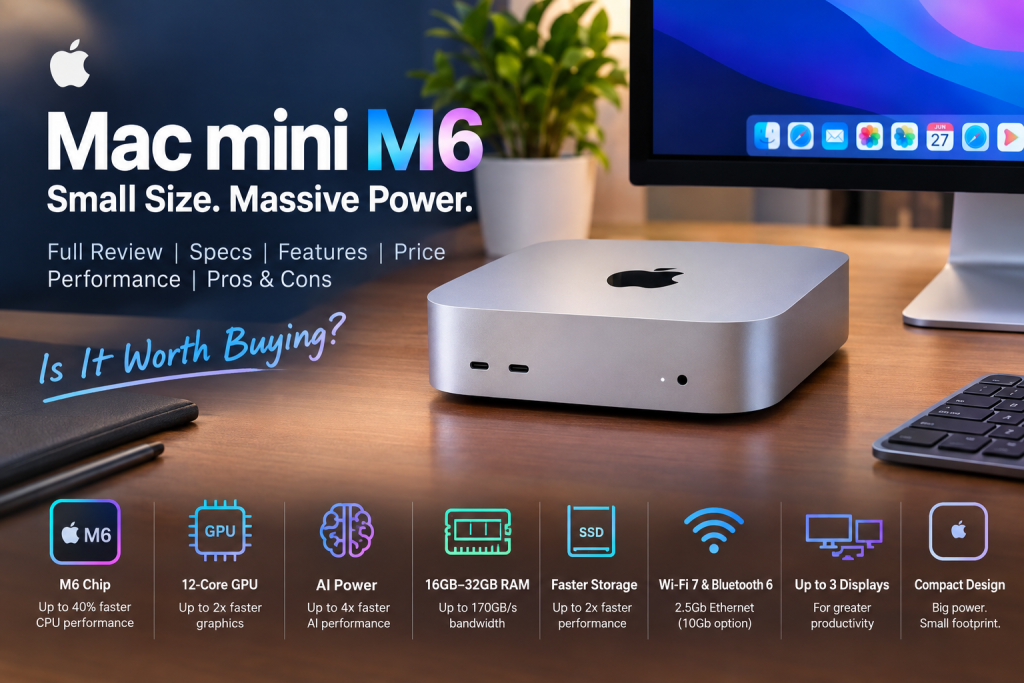
The new Mac mini also introduces Wi-Fi 7, Bluetooth 6, 2.5Gb Ethernet and improved AI hardware, while retaining the compact desktop design that made the Mac mini popular.
So, is the Mac mini M6 worth buying? And what makes it different from the M4 generation?
Let’s take a detailed look.
Mac mini M6 at a Glance
| Feature | Mac mini M6 |
|---|---|
| Processor | Apple M6 |
| CPU | 12-core |
| GPU | 12-core |
| Neural Engine | Dual 16-core Neural Engine |
| Memory | 16GB unified memory standard |
| Maximum Memory | Up to 32GB |
| Memory Bandwidth | Up to 170GB/s |
| Storage | SSD configurations available |
| Front Ports | 2 × USB-C + headphone jack |
| Rear Ports | 3 × Thunderbolt 4, HDMI, Ethernet |
| Ethernet | 2.5Gb standard; 10Gb option |
| Wireless | Wi-Fi 7, Bluetooth 6 |
| External Displays | Up to 3 |
| Operating System | macOS 27 |
| Starting Price in US | $899 |
| Availability | September 22, 2026 |
Apple officially lists the M6 Mac mini at a starting price of $899 in the United States, with availability beginning September 22, 2026.
What Is the Mac mini M6?
The Mac mini M6 is Apple’s latest compact desktop computer powered by the company’s sixth-generation M-series chip.
Unlike a MacBook, iMac or Mac Studio, the Mac mini doesn’t come with a built-in display, keyboard or mouse. Instead, you connect it to your own monitor and accessories.
That approach makes the Mac mini particularly attractive to users who already own a monitor.
The M6 version focuses heavily on:
- CPU performance
- GPU performance
- Local AI processing
- Faster memory
- Faster storage
- High-speed networking
- Multi-monitor productivity
- Compact desktop computing
Apple describes it as a machine capable of everything from everyday productivity to creative work and AI workflows.
Mac mini M6 Design
One of the biggest advantages of the Mac mini has always been its compact design.
Apple hasn’t dramatically changed the overall form factor for the M6 generation. Instead, the company has concentrated on putting significantly more computing power inside the small enclosure.
The machine continues to come in a silver finish and retains the compact appearance of the previous generation.
Why the small design matters
A compact desktop can be useful for:
- Small offices
- Home offices
- Students
- Content creators
- Developers
- Small businesses
- Home media setups
- AI enthusiasts
- Digital signage
- Server-style applications
You can place the Mac mini underneath or beside a monitor without taking up much desk space.
Mac mini M6 Processor
The biggest upgrade is obviously the M6 chip.
Apple’s M6 Mac mini features a 12-core CPU, compared with the 10-core CPU configuration of the previous M4 model.
The chip also features a 12-core GPU.
According to Apple, the M6 Mac mini delivers up to 40% faster CPU performance than the previous-generation Mac mini with M4.
That performance improvement should be noticeable in demanding applications and multitasking.
Everyday performance
For normal tasks such as:
- Web browsing
- Microsoft Office
- Google Docs
- Video calls
- Photo management
- Music
- Programming
- Multiple browser tabs
the M6 should have considerably more than enough performance.
The bigger story, however, is AI.
Mac mini M6 AI Performance
AI is one of the major themes of the M6 generation.
Apple has added Neural Accelerators to each GPU core, while the M6 also features a dual 16-core Neural Engine.
Apple claims up to 4x faster AI performance compared with the M4 Mac mini.
This could make the M6 particularly interesting for people who want to run AI workloads locally rather than depending entirely on cloud services.
Local AI applications
The Mac mini M6 can be used for tasks such as:
- Running local language models
- AI-assisted programming
- Image processing
- AI automation
- Text generation
- Data analysis
- AI agents
- Machine-learning experiments
Apple says the M6 can achieve up to 13.5x faster LLM prompt processing in LM Studio compared with M1, and up to 4.8x faster than M4 in its tested configuration.
Of course, real-world performance depends heavily on the software, model size and configuration.
Mac mini M6 GPU Performance
Graphics performance also gets a major upgrade.
The M6 includes a 12-core GPU, and Apple claims up to 2x faster graphics performance than the previous M4 Mac mini in its comparison configuration.
The improved GPU is useful for:
- Photo editing
- Video editing
- 3D applications
- Graphic design
- Animation
- Gaming
- AI workloads
- Creative software
Apple specifically highlights improved gaming performance with ray tracing.
According to Apple, the M6 can deliver up to 2x the gaming performance with ray tracing in Cyberpunk 2077: Ultimate Edition compared with the M4 Mac mini.
Mac mini M6 RAM and Memory
The Mac mini M6 starts with 16GB of unified memory and can be configured with up to 32GB.
The M6 also increases memory bandwidth to as much as 170GB/s.
Because Apple Silicon uses unified memory, the CPU and GPU share the same memory pool.
This can be particularly useful for applications that move large amounts of data between CPU and GPU.
Is 16GB enough?
For general users, 16GB should be perfectly adequate.
However, if you’re buying the Mac mini specifically for:
- Local AI models
- Professional video editing
- 3D rendering
- Software development
- Large datasets
- Heavy multitasking
then 32GB would be the more attractive choice.
Since memory isn’t something you can upgrade later, choosing the right configuration at purchase time is important.
Mac mini M6 Storage
Apple has also improved storage performance.
The company says the M6 Mac mini offers up to 2x faster storage performance compared with the previous-generation M4 configuration used for Apple’s comparison.
The entry-level configuration includes 256GB of storage, according to launch reporting.
For everyday users, 256GB may be enough if most files are stored in cloud services or external drives.
But for creators, developers and people working with large media files, choosing more internal storage—or budgeting for a fast external SSD—is sensible.
Mac mini M6 Ports and Connectivity
Connectivity is another important upgrade.
The M6 Mac mini includes:
Front
- Two USB-C ports
- Headphone jack with high-impedance headphone support
Rear
- Three Thunderbolt 4 ports
- HDMI
- Ethernet
The machine also supports Wi-Fi 7 and Bluetooth 6.
2.5Gb Ethernet
The Mac mini M6 comes with 2.5Gb Ethernet as standard, while Apple offers a 10Gb Ethernet option.
This is particularly useful for:
- NAS users
- Video editors
- Developers
- Home servers
- Businesses
- Large file transfers
- Local AI systems
For a normal home internet connection, however, 2.5Gb Ethernet may already be more than enough.
Mac mini M6 Display Support
The M6 Mac mini can support up to three external displays.
This is one of the reasons the Mac mini can work well as a serious desktop workstation.
A multi-monitor setup is particularly useful for:
- Programming
- Stock analysis
- Video editing
- Research
- Music production
- Office work
- Graphic design
- Content creation
You can dedicate different screens to different applications and dramatically improve your workflow.
macOS 27 and Apple Intelligence
The Mac mini M6 is designed to work with Apple’s upcoming macOS 27.
Apple is putting a major emphasis on AI in this software generation.
Features include improvements around:
- Siri
- Apple Intelligence
- Spotlight
- Shortcuts
- Photos
- Safari
- Visual Intelligence
- System-wide AI assistance
Apple says Siri AI will become more capable and can use personal context to help users complete tasks across apps.
For M6 users, this combination of powerful hardware and AI-focused software could become one of the machine’s biggest advantages.
Mac mini M6 for Students
The Mac mini M6 could be an excellent desktop for students.
It’s powerful enough for:
- Microsoft Office
- Web research
- Programming
- Graphic design
- Video editing
- Online classes
- Presentations
- Research projects
The compact design also makes it easier to build a clean study desk.
The main additional cost is the display and peripherals.
If you already own a good monitor, keyboard and mouse, the Mac mini becomes much more attractive.
Mac mini M6 for Content Creators
Content creators are another group that could benefit from the M6.
The combination of a powerful CPU, GPU, unified memory and fast storage makes the computer suitable for:
- YouTube video editing
- Photo editing
- Podcast production
- Music production
- Graphic design
- Short-form video
- Motion graphics
Apps such as Final Cut Pro, Adobe Photoshop and other professional creative software can take advantage of Apple’s high-performance architecture.
For professional users who need significantly more GPU and memory headroom, however, the M5 Pro Mac mini may make more sense.
Mac mini M6 for Programmers
Developers should also find the M6 Mac mini interesting.
It can serve as a compact development workstation for:
- Web development
- iOS development
- macOS development
- Python
- JavaScript
- Swift
- Docker
- Databases
- AI development
- Local LLM experimentation
The M6’s fast CPU performance and unified memory can make it particularly useful for developers who frequently run several applications and services simultaneously.
Mac mini M6 for Gaming
Apple is increasingly serious about gaming, and the M6’s faster GPU makes the Mac mini more interesting as a gaming computer.
The improved graphics architecture and ray tracing support provide more gaming potential than earlier Mac mini generations.
However, the Mac mini should still not be considered a direct replacement for a high-end Windows gaming PC.
The main issue is game availability.
If your primary purpose is playing a huge library of PC games, Windows remains the safer choice.
But for users who want a compact computer capable of both productivity and increasingly capable gaming, the M6 is compelling.
Mac mini M6 vs Mac mini M4
The M6 represents a substantial generational upgrade.
| Feature | Mac mini M4 | Mac mini M6 |
|---|---|---|
| CPU | Up to 10 cores | 12 cores |
| GPU | Up to 10 cores | 12 cores |
| Memory bandwidth | Lower | Up to 170GB/s |
| AI | Neural Engine | Dual 16-core Neural Engine + GPU Neural Accelerators |
| Graphics | Strong | Up to 2x faster |
| AI performance | Strong | Up to 4x faster |
| Storage performance | Previous generation | Up to 2x faster |
| Wi-Fi | Previous generation | Wi-Fi 7 |
| Bluetooth | Previous generation | Bluetooth 6 |
| Ethernet | 1Gb standard on prior model | 2.5Gb standard |
| Starting US price | Previously lower | $899 |
Apple claims up to 40% faster CPU performance, 2x faster graphics and 4x faster AI performance for M6 versus M4 in its specified comparisons.
Mac mini M6 vs M5 Pro
Apple has launched the Mac mini with two major chip choices: M6 and M5 Pro.
The M6 is aimed at mainstream users, developers, creators and AI enthusiasts.
The M5 Pro is designed for significantly heavier professional workloads.
The M5 Pro version starts at $1,699 in the United States and includes more powerful CPU/GPU configurations.
The M5 Pro model can be configured with up to an 18-core CPU and 20-core GPU, according to Apple.
Choose M6 if:
- You want excellent everyday performance
- You edit photos and videos
- You develop software
- You want local AI capability
- You want the lower price
- You don’t need extreme professional performance
Choose M5 Pro if:
- You edit professional video
- You work with 3D rendering
- You run demanding professional applications
- You work with large AI workloads
- You need maximum CPU/GPU performance
Mac mini M6 Price
The Mac mini M6 starts at $899 in the United States.
Apple has also announced education pricing starting at $799 in the US.
The M5 Pro model starts at $1,699.
Pricing in Bangladesh will naturally depend on:
- Import costs
- VAT and taxes
- Retailer margins
- Warranty
- Configuration
- Exchange rates
- Availability
Therefore, buyers in Bangladesh should compare the final local price rather than converting the US price directly.
Is the Mac mini M6 Expensive?
At $899, the M6 Mac mini is more expensive than the previous Mac mini’s original entry price.
However, the computer is not directly comparable with a complete desktop PC because Apple sells it as a compact computer that requires a separate display and peripherals.
If you already have a monitor, keyboard and mouse, the overall value becomes considerably better.
If you need to purchase everything from scratch, the total setup cost can become much higher.
Mac mini M6 Pros
Excellent performance
The M6 provides substantial CPU, GPU and AI improvements.
Compact design
It takes very little desk space.
Strong AI hardware
The combination of Neural Accelerators and a dual Neural Engine makes the M6 interesting for local AI workloads.
Fast connectivity
Wi-Fi 7, Bluetooth 6 and 2.5Gb Ethernet are excellent additions.
Multiple displays
Support for up to three external displays makes it suitable for serious desktop workflows.
Quiet desktop experience
Apple’s compact desktop approach remains attractive for people who don’t want a large traditional PC tower.
Mac mini M6 Cons
No display included
You’ll need to purchase or already own a monitor.
No keyboard or mouse
Those accessories are also separate.
Limited upgradeability
Like other Apple Silicon Macs, you should carefully choose memory and storage when buying.
Higher starting price
The $899 starting price makes the M6 less of a budget Mac than earlier entry-level Mac mini models.
Gaming limitations
The hardware is increasingly capable, but macOS still doesn’t have the same game library as Windows.
Who Should Buy the Mac mini M6?
The Mac mini M6 is particularly suitable for:
Students: Excellent for studying, programming and creative projects.
Office users: Fast and compact enough for demanding productivity.
Developers: Great CPU performance and local AI capabilities.
Content creators: Strong performance for photo and video workflows.
AI enthusiasts: One of the most interesting compact Macs for local AI experimentation.
Home users: A powerful computer without the bulk of a traditional desktop tower.
Small businesses: Compact, fast and suitable for many business applications.
Who Should Not Buy the Mac mini M6?
You may want to consider alternatives if:
- You need a laptop
- You want a built-in display
- You primarily play Windows-only games
- You need user-upgradable RAM
- You need a large number of internal expansion slots
- You already own a very powerful M4 Mac mini and don’t need additional performance
For many M4 owners, upgrading makes the most sense when their workload actually benefits from the M6’s faster AI, graphics or CPU performance.
Mac mini M6: Is 16GB or 32GB Better?
This is one of the most important buying decisions.
16GB
Choose 16GB if you mainly use:
- Chrome/Safari
- Office applications
- Streaming
- Basic programming
- Light photo editing
- Everyday productivity
32GB
Choose 32GB if you plan to:
- Run local AI models
- Use virtual machines
- Edit large videos
- Work with large Photoshop files
- Run multiple development environments
- Use Docker extensively
- Keep the Mac for many years
For a long-term purchase, 32GB is the configuration I would favor for power users.
Mac mini M6 for Bangladesh Users
For Bangladeshi buyers, the Mac mini M6 could be especially attractive because a desktop setup can be customized around an existing monitor.
For example, someone who already has a good 24-inch or 27-inch display doesn’t need to buy an all-in-one computer.
The Mac mini can simply become the central computing unit.
However, buyers should carefully check:
- Official versus unofficial warranty
- Local retailer reputation
- RAM configuration
- SSD capacity
- Keyboard layout
- Power accessories
- Return policy
- Final Bangladesh price
The US price should not be treated as the final Bangladesh retail price.
Mac mini M6: Frequently Asked Questions
Is Mac mini M6 officially available?
Yes. Apple announced the M6 Mac mini on August 25, 2026, with availability beginning September 22, 2026.
How much does Mac mini M6 cost?
The M6 Mac mini starts at $899 in the United States.
Does Mac mini M6 include a monitor?
No. You need to purchase a monitor separately.
Does Mac mini M6 include a keyboard?
No. Keyboard and mouse are separate accessories.
How much RAM does Mac mini M6 have?
The standard configuration includes 16GB unified memory, with configurations available up to 32GB.
Does Mac mini M6 support Wi-Fi 7?
Yes. The new Mac mini supports Wi-Fi 7 and Bluetooth 6.
Does Mac mini M6 have Ethernet?
Yes. It includes 2.5Gb Ethernet, with a 10Gb option available.
How many monitors can Mac mini M6 support?
The M6 Mac mini can natively support up to three external displays.
Is Mac mini M6 good for video editing?
Yes. Its CPU, GPU, unified memory and fast storage make it well suited to video editing.
Is Mac mini M6 good for programming?
Yes. Developers can benefit from its strong CPU performance, memory and macOS development ecosystem.
Is Mac mini M6 good for AI?
Yes. AI is one of its major strengths. Apple claims up to four times the AI performance of the M4 model in its specified comparison.
Can Mac mini M6 run local AI models?
Yes. Apple specifically highlights local AI workloads and LLM processing on the new M6 Mac mini.
Is Mac mini M6 good for gaming?
It can handle supported Mac games well, and Apple reports major ray-tracing improvements. However, Windows remains a better choice for the widest PC gaming library.
Is Mac mini M6 worth upgrading from M4?
It depends. The upgrade is more compelling for users who need substantially faster AI, graphics, storage or CPU performance.
Is 16GB enough for Mac mini M6?
For normal users, yes. Heavy AI, creative and professional users should consider 32GB.
Does Mac mini M6 have Thunderbolt?
Yes. The M6 model has three rear Thunderbolt 4 ports.
Final Verdict: Should You Buy Mac mini M6?
The Mac mini M6 is one of Apple’s most interesting compact desktops in 2026.
Its appeal isn’t simply that it is faster. The biggest improvement is the combination of CPU performance, GPU capability, local AI acceleration, faster memory, faster storage and modern connectivity in a tiny desktop computer.
Apple claims up to 40% faster CPU performance, 2x faster graphics and storage, and 4x faster AI performance compared with the previous-generation M4 Mac mini in its specified tests.
For students, programmers, office workers, creators and AI enthusiasts, the M6 model offers an impressive balance of performance and size.
The biggest drawbacks are the higher starting price and the fact that you need to supply your own monitor and peripherals.
Overall, the Mac mini M6 is an excellent choice for anyone looking for a powerful, compact macOS desktop—and its AI capabilities could make it even more valuable as local AI becomes increasingly important.
Rating: 9/10
Best for: Productivity, programming, AI, content creation, home offices and compact workstations.
Consider the M5 Pro instead: If your work involves professional video, 3D rendering or exceptionally demanding AI and graphics workloads.