New 14-Inch MacBook Pro with M6: Features, Performance, Price, and Release Date
Apple has introduced the new 14-inch MacBook Pro with M6, bringing faster processing, improved graphics, enhanced on-device artificial intelligence (AI), and modern wireless connectivity to its professional laptop lineup. Announced on October 27, 2026, the latest MacBook Pro is designed for students, software developers, creative professionals, business users, and anyone who needs powerful performance in a portable computer.
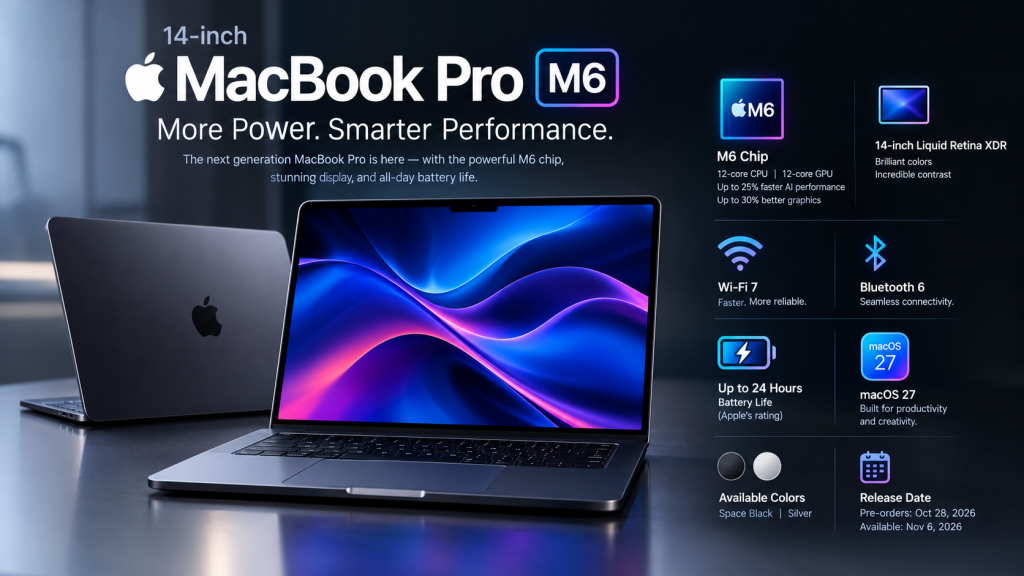
The new M6 chip features a 12-core CPU and a 12-core GPU, delivering significant performance improvements over the previous M5 generation, according to Apple. The laptop also supports Wi-Fi 7, Bluetooth 6, and Apple’s latest macOS 27 software.
But what makes the new 14-inch MacBook Pro worth considering? How much faster is the M6 chip, when can customers buy it, and who should upgrade? This comprehensive guide explores its key features, expected real-world benefits, availability, and buying considerations.
New 14-Inch MacBook Pro with M6: Key Specifications
The new MacBook Pro combines Apple’s latest M-series processor with a portable 14-inch design. Here is an overview of its officially announced highlights.
| Feature | Specifications |
|---|---|
| Product | Apple MacBook Pro 14-inch |
| Processor | Apple M6 |
| CPU | 12-core CPU |
| GPU | 12-core GPU |
| AI hardware | Dual 16-core Neural Engine and GPU Neural Accelerators |
| Display | Liquid Retina XDR |
| Wireless connectivity | Wi-Fi 7 |
| Bluetooth | Bluetooth 6 |
| Operating system | macOS 27 |
| Battery life | Up to 24 hours, as rated by Apple |
| Available colors | Space Black and Silver |
| Pre-orders begin | October 28, 2026 |
| Availability begins | November 6, 2026 |
Note: Performance and battery figures are Apple’s stated claims. Actual results may vary depending on workload, settings, and configuration.
Apple M6 Chip: Faster Performance for Everyday and Professional Work
The biggest highlight of the new 14-inch MacBook Pro is its M6 processor. Apple designed this chip to improve CPU performance, graphics processing, and AI acceleration.
12-Core CPU for Demanding Workloads
The M6 features a 12-core CPU designed to handle multitasking and demanding applications efficiently. Users can expect responsive performance when working with large documents, developing software, managing complex spreadsheets, and running professional creative applications.
For developers, faster compilation can reduce the time required to build projects. Apple reports that compiling projects in Xcode can be up to 2.5 times faster than on the 13-inch MacBook Pro with M1 and up to 1.3 times faster than on the 14-inch MacBook Pro with M5.
These improvements could be especially useful for people who regularly work on large software projects.
12-Core GPU for Improved Graphics
The new M6 includes a 12-core GPU that delivers up to 30% faster graphics performance compared with M5, according to Apple.
A faster GPU can benefit video editors, graphic designers, photographers, and other creative professionals. It can help with graphics-intensive applications, visual effects, image processing, and compatible 3D workloads.
However, the exact performance improvement depends on the application and the task being performed.
Enhanced AI Capabilities with Apple M6
Artificial intelligence is an important part of Apple’s latest computing strategy, and the M6 introduces hardware improvements designed to accelerate AI workloads.
Faster On-Device AI Processing
Apple says the M6 delivers up to 25% faster AI workloads than M5. The chip combines GPU Neural Accelerators with a Dual 16-core Neural Engine to support compatible AI applications.
Potential benefits include:
- Faster AI-assisted image editing.
- Improved performance for compatible creative tools.
- More responsive supported Apple Intelligence features.
- Better acceleration for certain local machine-learning tasks.
- More efficient execution of supported AI workloads.
Running AI Models Locally
One potential advantage of powerful on-device AI hardware is the ability to run compatible AI models directly on a computer rather than relying entirely on remote cloud servers.
This can be useful for developers and researchers who experiment with local language models or machine-learning applications. Local processing may also help keep certain data on the device, although privacy depends on the application, its settings, and whether it sends information to external services.
The M6’s AI performance should therefore interest users who regularly work with supported AI tools. Nevertheless, model size, available memory, and software compatibility will affect what the laptop can run effectively.
Liquid Retina XDR Display for Creative Professionals
The 14-inch MacBook Pro continues to feature Apple’s Liquid Retina XDR display, a key attraction for people who work with photographs, videos, graphics, and other visual content.
The display technology is designed to deliver high contrast, bright highlights, and detailed images. These qualities are useful when editing photographs, reviewing HDR video, designing digital artwork, or working with professional creative applications.
The 14-inch format also offers a balance between screen space and portability. It is large enough for many productivity and creative tasks while remaining convenient for travel, classes, meetings, and working away from a desk.
Users considering this model specifically for an OLED display or touchscreen should check the exact product specifications before purchasing. The standard M6 model announced here is the conventional 14-inch MacBook Pro, not a touchscreen redesign.
Battery Life and Portable Design
Battery life remains an important consideration for anyone choosing a premium laptop. Apple rates the new 14-inch MacBook Pro with M6 for up to 24 hours of battery life.
This figure represents Apple’s stated maximum under specified testing conditions rather than a guarantee of all-day runtime for every workload. Video editing, gaming, software compilation, high screen brightness, and sustained AI processing can affect battery consumption.
For students, professionals, and frequent travelers, the combination of a compact 14-inch form factor and long rated battery life makes the laptop suitable for working away from a power outlet.
The new model is available in Space Black and Silver, continuing Apple’s understated professional design approach.
Wi-Fi 7 and Bluetooth 6 Connectivity
The M6 MacBook Pro introduces Wi-Fi 7 and Bluetooth 6, offering updated wireless connectivity.
Wi-Fi 7 can support faster wireless networking, lower latency, and improved network efficiency when paired with compatible routers and network conditions. Actual speeds depend on the router, internet connection, signal strength, and local interference.
Bluetooth 6 brings a newer generation of Bluetooth technology for compatible wireless accessories. Users may benefit from connecting supported headphones, keyboards, mice, and other peripherals.
These connectivity upgrades are useful for people who regularly transfer large files, collaborate online, connect wireless accessories, or work across multiple locations.
macOS 27: Software for Productivity and Creativity
The new MacBook Pro runs macOS 27, Apple’s desktop operating system for the Mac.
The software provides the environment for running everyday applications, creative tools, development platforms, and supported AI features. Combined with the M6 chip, it is designed to deliver a responsive experience across different types of work.
Users can use compatible productivity applications, organize files, participate in video meetings, develop software, and edit media. Apple’s broader ecosystem may also be useful for people who already use an iPhone or iPad.
Before purchasing, check that your essential professional applications, plug-ins, external devices, and development tools are compatible with the operating system and the specific Mac configuration.
M6 vs. M5 MacBook Pro: What Has Changed?
The new M6 model focuses on processor performance, graphics, AI acceleration, and wireless connectivity.
| Feature | MacBook Pro with M6 | MacBook Pro with M5 |
|---|---|---|
| Processor generation | M6 | M5 |
| CPU | 12-core | Varies by configuration |
| GPU | 12-core | Varies by configuration |
| Graphics improvement | Up to 30% versus M5, according to Apple | Previous generation |
| AI workload improvement | Up to 25% versus M5, according to Apple | Previous generation |
| Wireless | Wi-Fi 7, Bluetooth 6 | Depends on model |
| Main reason to choose | Newer chip and AI capabilities | Potential discounts and adequate existing performance |
The comparison needs some context. Apple’s percentages are maximum claimed improvements, not guarantees that every application will become 30% faster or every AI task will improve by 25%.
If you already own an M5 MacBook Pro and primarily browse the web, write documents, or perform routine office work, the difference may not justify an immediate upgrade. Users moving from an Intel Mac or an older M1 model may have stronger reasons to consider the new machine.
Who Should Buy the New 14-Inch MacBook Pro with M6?
Students and University Users
Students who need a laptop for research, writing, programming, presentations, and creative projects may appreciate its portable design and performance. However, a MacBook Air or another less expensive laptop may be sufficient for users whose work involves mostly basic tasks.
Software Developers
Developers working with Xcode and compatible development tools could benefit from faster compilation and improved performance. Those building large projects should also consider memory capacity, storage requirements, and the needs of their specific development environment.
Video Editors and Content Creators
The M6 GPU and AI acceleration could be valuable for supported editing, effects, photography, and design applications. Professionals should evaluate their actual software workloads and check whether their preferred applications take full advantage of the chip.
Business Professionals
The MacBook Pro can suit users who regularly multitask, analyze large files, participate in meetings, and work with demanding applications. Its connectivity options and portable format may be useful for hybrid and mobile working arrangements.
AI Developers and Researchers
People experimenting with compatible local AI models may benefit from the upgraded AI hardware. They should pay particular attention to unified memory, model requirements, and software compatibility before selecting a configuration.
New 14-Inch MacBook Pro with M6: Release Date and Availability
Apple announced the new 14-inch MacBook Pro with M6 on October 27, 2026.
According to Apple’s announcement:
- Pre-orders begin: October 28, 2026.
- Availability begins: November 6, 2026.
- Initial pre-order regions: 35 countries and regions, including the United States.
Availability may differ by country, retailer, and configuration. Buyers outside the initial launch regions should check Apple’s regional website or an authorized reseller for local ordering information.
Customers in Bangladesh should also confirm local availability, the final price in Bangladeshi taka, the warranty terms, and whether the device is an official regional product or an imported unit.
New 14-Inch MacBook Pro with M6: Price
Apple’s announcement establishes the product and its release schedule, but buyers should verify the exact starting price and configuration on Apple’s official store before ordering.
The final cost can depend on the country, memory and storage configuration, taxes, import duties, and retailer pricing. For Bangladesh, imported MacBooks may carry additional costs compared with the advertised US price.
Before buying, compare the complete price rather than the advertised base price alone. Check the available memory and storage, warranty coverage, return policy, and keyboard layout.
Should You Upgrade to the M6 MacBook Pro?
The right decision depends on your current laptop and the work you perform.
Consider upgrading if:
- You are moving from an older Intel-based Mac.
- You use an M1 MacBook Pro and need substantially better performance.
- Your work regularly involves graphics-intensive applications or compatible AI tools.
- Faster software compilation would save you meaningful time.
- You need newer wireless connectivity and a professional portable laptop.
Consider keeping your current laptop if:
- Your M5 MacBook Pro already handles your workload comfortably.
- You mainly use a browser, office applications, and basic productivity tools.
- Your current machine has enough memory and storage.
- You would benefit more from saving money than from incremental performance improvements.
If your priority is a touchscreen or OLED redesign, compare the complete MacBook Pro lineup before deciding. The newest chip generation is not necessarily the best choice for every professional workload.
Frequently Asked Questions (FAQs)
1. When was the 14-inch MacBook Pro with M6 announced?
Apple announced the new 14-inch MacBook Pro with M6 on October 27, 2026.
2. When can I pre-order the MacBook Pro M6?
Pre-orders begin on October 28, 2026, in Apple’s initial launch markets.
3. When will the new MacBook Pro become available?
Apple says availability begins November 6, 2026, with regional availability subject to change.
4. What processor does the MacBook Pro M6 use?
It features Apple’s M6 chip with a 12-core CPU and a 12-core GPU.
5. How much faster is the M6 than the M5?
Apple claims up to 30% faster graphics performance and up to 25% faster AI workloads compared with M5. Actual results depend on the application and workload.
6. Does the MacBook Pro M6 support Wi-Fi 7?
Yes. Apple lists Wi-Fi 7 and Bluetooth 6 among the new model’s connectivity features.
7. How long does the MacBook Pro M6 battery last?
Apple rates the battery for up to 24 hours. Actual runtime varies according to use, settings, and environmental conditions.
8. Is the MacBook Pro M6 suitable for video editing?
It may be an excellent option for compatible video-editing workflows, particularly those that benefit from GPU acceleration. The best configuration depends on project complexity, memory needs, and the editing software.
9. Is the M6 MacBook Pro good for AI development?
The additional Neural Accelerators and Neural Engine are designed to improve supported AI workloads. Developers should check the memory requirements and compatibility of the models and tools they plan to use.
10. Should M5 MacBook Pro owners upgrade to M6?
Not necessarily. Users who need additional graphics or AI performance may benefit, while those whose current M5 laptop already meets their needs may prefer to wait.
Final Verdict
The new 14-inch MacBook Pro with M6 brings meaningful improvements in processing power, graphics performance, AI acceleration, and wireless connectivity. Its 12-core CPU, 12-core GPU, Liquid Retina XDR display, and up-to-24-hour rated battery life make it an attractive option for professionals, developers, students, and creative users.
The biggest reason to consider this model is its combination of performance and portability. However, the value of upgrading depends on your existing computer, workload, budget, and configuration requirements.
If you use an older Intel or M1 MacBook Pro, the M6 could offer a compelling upgrade. If you already own a capable M5 model, compare the practical benefits against the total purchase cost before making a decision.
For buyers planning to purchase the new MacBook Pro, checking official regional availability, full specifications, and warranty coverage is the best way to make an informed choice.