iOS 27 Update: New Features, Supported iPhones, Siri AI & Everything You Need to Know
Apple has officially released the iOS 27 update, bringing a major new generation of Apple Intelligence, a dramatically more capable Siri, improved visual AI tools, performance enhancements, refined Liquid Glass design options, better family controls, and numerous improvements across the iPhone experience.
The final iOS 27 release became available on September 14, 2026. Apple describes the update as a combination of smarter AI-powered experiences, improved performance, enhanced privacy, stronger child-safety tools, and refinements across the operating system.
One of the biggest changes is Siri AI. Instead of functioning mainly as a traditional voice assistant, the new Siri can have more natural conversations, understand personal context, answer questions about what’s on your screen, interact with apps, and use web information to provide current answers.
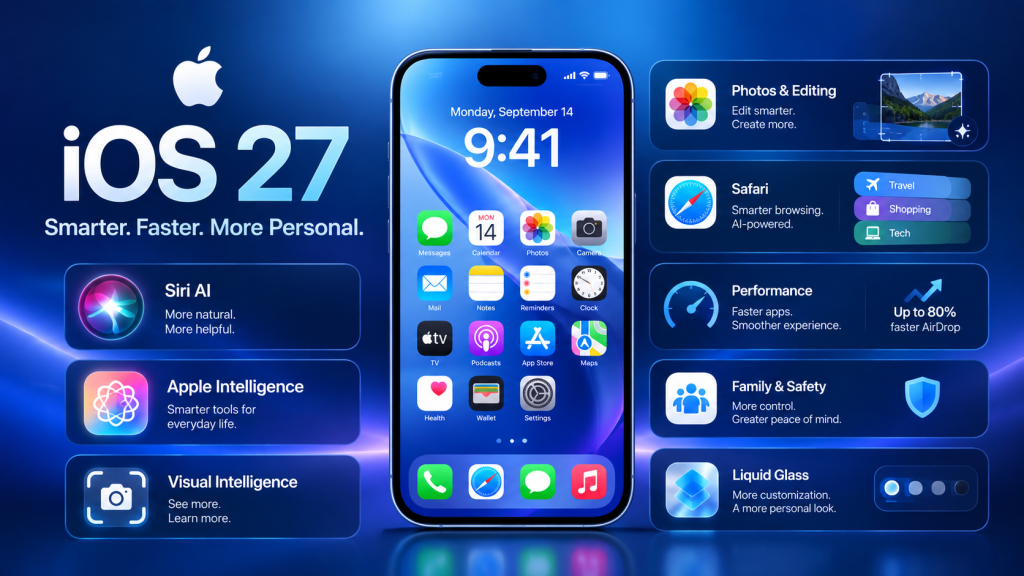
For iPhone users, the iOS 27 update is therefore much more than a routine software upgrade. It introduces new AI capabilities while also improving everyday functions such as Photos, Safari, Messages, AirDrop, search, and system performance.
iOS 27 Release Date
Apple released iOS 27 on September 14, 2026. The update follows Apple’s annual major iOS release cycle and is available for compatible iPhone models.
The update was first introduced during Apple’s June 2026 developer event and subsequently went through beta testing before the public release.
If your iPhone supports iOS 27, you can check for the update by going to:
Settings → General → Software Update
Before installing a major operating-system update, it is a good idea to back up important photos, documents, messages, and other data.
What’s New in the iOS 27 Update?
The iOS 27 update includes improvements across several areas of the iPhone experience.
The biggest additions include:
- New Siri AI
- Expanded Apple Intelligence
- Improved Visual Intelligence
- New AI-powered photo editing
- Smarter Safari features
- AI-powered writing assistance
- Better app performance
- Faster AirDrop
- Improved search
- Refined Liquid Glass design
- New child-safety features
- Redesigned Screen Time controls
- Improved connectivity
- Enhanced iCloud Shared Albums
- Additional accessibility and ecosystem improvements
Let’s look at the most important iOS 27 features in detail.
1. New Siri AI
The biggest headline feature of iOS 27 is the next-generation Siri AI.
Apple has redesigned Siri to make it significantly more conversational and context-aware. The new assistant is powered by the next generation of Apple Intelligence and can understand requests in a more natural way.
Instead of simply responding to commands such as setting alarms or opening applications, Siri AI can handle more complex requests.
For example, users can ask Siri to:
- Find information from messages
- Locate information in emails
- Search through photos
- Answer questions about what’s on the screen
- Perform actions inside supported apps
- Help write or edit text
- Search the web for current information
- Continue conversations naturally
Apple says Siri AI can understand personal context from information such as messages, emails, and photos, allowing it to provide more relevant assistance.
Siri AI Can Take Actions in Apps
Another major improvement is the ability to perform actions across apps.
Apple demonstrates Siri AI performing tasks involving apps such as Messages, Music, Reminders and other system applications.
This moves Siri closer to an AI assistant that can actually help complete tasks rather than simply answer questions.
2. Dedicated Siri App
iOS 27 also introduces a dedicated Siri application.
The Siri app brings conversations together in one place, allowing users to start a conversation on one Apple device and continue it on another. Apple says conversational history can privately sync across supported Apple products using iCloud.
This could be particularly useful for people who use multiple Apple devices.
For example, you could begin a conversation on your iPhone and continue it later on an iPad or Mac.
3. Siri Understands Personal Context
One of the more significant changes in iOS 27 is Siri’s ability to work with personal context.
Apple says Siri AI can search information across areas such as:
- Messages
- Emails
- Photos
- Notes
- Other supported content
For example, you could ask Siri to find a photo from a previous trip or locate information buried in an email.
This makes the assistant more useful for everyday information retrieval.
4. Visual Intelligence Gets More Powerful
Visual Intelligence receives an important expansion in iOS 27.
Users can use Visual Intelligence to understand objects, images, and information around them or on their screen.
Apple has also integrated a Siri mode into the Camera app, allowing users to ask questions about what the camera sees and take certain actions based on the information.
Visual Intelligence can also work with content displayed on the screen, allowing users to ask questions about what they are viewing.
This could be useful for:
- Identifying objects
- Understanding visual information
- Getting information about products
- Understanding documents
- Asking questions about onscreen content
- Taking actions based on visual information
5. AI-Powered Photo Editing
The Photos app receives several new Apple Intelligence capabilities.
Apple highlights three important tools:
- Spatial Reframing
- Extend
- An improved Clean Up tool
These tools provide additional ways to edit photos while preserving the original image and moment captured.
The improved Clean Up feature can be particularly useful for removing unwanted elements from photos.
Meanwhile, Spatial Reframing and Extend provide additional creative possibilities for modifying image composition.
6. Image Playground Improvements
Apple is also expanding its AI image-generation capabilities through Image Playground.
According to Apple, Image Playground can create high-quality images in a wide variety of styles, including photorealistic styles.
Apple also says image metadata and planned SynthID support can help users identify images that have been generated or edited using AI.
For creators and casual users, this makes AI-assisted image creation more integrated into the Apple ecosystem.
7. Smarter Safari
Safari receives several AI-powered improvements in iOS 27.
One notable feature can automatically organize Safari tabs into topics.
For people who regularly keep dozens of tabs open, automatic organization could make it easier to find related websites.
Apple also introduces a Notify Me capability that can alert users when a website changes, such as when a product is back in stock or when a price changes.
Another new capability allows users to describe a Shortcut and have Apple Intelligence help create a custom extension.
These features make Safari more useful for research, shopping, browsing and productivity.
8. Write With Siri
iOS 27 also expands AI-assisted writing.
With Write with Siri, users can describe what they want and have Siri generate a draft or help improve existing writing.
This can be useful for:
- Emails
- Messages
- Notes
- Work documents
- Social media drafts
- Everyday writing
Apple’s updated AI writing capabilities can also help refine text while maintaining the user’s intended tone and style in supported experiences.
9. Call Context
Another interesting Apple Intelligence feature is Call Context.
When you’re speaking with a business, Call Context can surface useful information from across supported apps.
For example, Apple describes scenarios where information such as a confirmation code or reservation number can be surfaced during a call.
This could reduce the need to switch between apps while talking to customer service or businesses.
10. iOS 27 Performance Improvements
Apple says iOS 27 isn’t only about AI.
The company has also made improvements to overall system performance.
According to Apple’s testing, on supported iPhone and iPad devices:
- Apps can launch up to 30% faster
- Photos can load up to 70% faster after being taken
- AirDrop transfers can be up to 80% faster
Apple notes that these figures are based on its own testing and that actual performance can vary depending on configuration, settings, usage and other conditions.
This means older compatible iPhones may still benefit from the update even if they don’t receive every Apple Intelligence feature.
11. Faster AirDrop
AirDrop receives performance improvements in iOS 27.
Apple reports that AirDrop transfers can be up to 80% faster under its test conditions.
For users who frequently transfer:
- Photos
- Videos
- Documents
- Large files
this could make everyday sharing more convenient.
12. Better Connectivity
iOS 27 also improves the transition between cellular networks and Wi-Fi.
Apple says switching between cellular and Wi-Fi networks is designed to be more seamless on iPhone and iPad.
Messages also receive a useful improvement for low-bandwidth situations.
Large photos or videos can continue sending without preventing users from sending subsequent text messages.
13. Improved Search
Search has also been refined across Apple’s platforms.
Apple says search in areas such as Spotlight, Photos and Mail is more stable, efficient and comprehensive.
Mail also receives a new ranking system intended to surface more relevant results in Top Hits.
For people with thousands of emails, photos and documents, improvements to search can make a meaningful difference in everyday use.
14. Liquid Glass Refinements
iOS 27 continues Apple’s Liquid Glass design direction while adding more customization.
Apple has introduced a new slider in Settings that lets users personalize the appearance of Liquid Glass, ranging from ultraclear to fully tinted.
Apple has also updated app icons to make them sharper and more defined.
This gives users greater control over how the interface looks rather than forcing everyone into exactly the same visual presentation.
15. New Child Safety Features
Apple has introduced additional child-safety controls with its latest software releases.
Parents can more easily control:
- Which apps children can access
- Who children can communicate with
- Which websites they can visit
- When certain apps can be used
- Screen Time schedules
A new Ask to Browse feature allows parents to require approval before children access a new website in Safari.
Communication Safety has also been expanded to detect and intervene when gore or violent content is detected in shared images or videos.
16. Redesigned Screen Time
Screen Time receives a redesigned experience intended to make parental controls easier to understand.
Parents can see information such as:
- Average device usage
- Most-used apps
- Entertainment usage
- Gaming usage
- Social media usage
Parents can also establish schedules controlling when children can access certain apps.
These changes make iOS 27 more useful for families who want more structured device-management options.
17. iCloud Shared Albums Improvements
iCloud Shared Albums also receives an important improvement.
Apple says Shared Albums now support full-resolution photo and video sharing, while also making it easier for Android and Windows users to join and contribute.
This is particularly useful for families and groups where not everyone uses an iPhone.
18. Which iPhones Support iOS 27?
One of the most important questions for iPhone owners is whether their device can install the update.
Apple’s official compatibility list includes a wide range of models, from the latest iPhone generation back to the iPhone 11 series and iPhone SE (2nd generation and later).
iOS 27 Compatible iPhones
The supported models include:
- iPhone 18 Pro Max
- iPhone 18 Pro
- iPhone 17 Pro Max
- iPhone 17 Pro
- iPhone Air
- iPhone 17
- iPhone 17e
- iPhone 16 Pro Max
- iPhone 16 Pro
- iPhone 16 Plus
- iPhone 16
- iPhone 16e
- iPhone 15 Pro Max
- iPhone 15 Pro
- iPhone 15 Plus
- iPhone 15
- iPhone 14 Pro Max
- iPhone 14 Pro
- iPhone 14 Plus
- iPhone 14
- iPhone 13 Pro Max
- iPhone 13 Pro
- iPhone 13
- iPhone 13 mini
- iPhone 12 Pro Max
- iPhone 12 Pro
- iPhone 12
- iPhone 12 mini
- iPhone 11 Pro Max
- iPhone 11 Pro
- iPhone 11
- iPhone SE (2nd generation and later)
However, being compatible with iOS 27 does not mean every iPhone gets every Apple Intelligence feature.
19. Which iPhones Support Apple Intelligence in iOS 27?
Apple Intelligence has more demanding hardware requirements than basic iOS 27 compatibility.
Apple lists Apple Intelligence support on:
- iPhone 15 Pro
- iPhone 15 Pro Max
- iPhone 16 models and later
- iPhone Air
- iPhone 17 series
- iPhone 18 series
- iPhone Duo
and other supported Apple devices.
Therefore, an older iPhone such as the iPhone 11 can receive iOS 27 while not receiving the full set of Apple Intelligence capabilities.
This distinction is important when deciding what to expect from the update.
20. iOS 27 and Apple Intelligence Availability
Apple Intelligence features can vary by device, language and region.
Apple says Siri AI initially rolls out as a beta in English, with French, Japanese, Korean, Portuguese and Spanish scheduled to follow in October 2026.
Apple also notes that some features may not be available in every language or region.
For users in Bangladesh, this means the availability of particular AI features should be checked against Apple’s current language and regional requirements before assuming every feature will work identically.
21. iOS 27 Privacy Features
Privacy remains a major part of Apple’s approach to Apple Intelligence.
Apple says Apple Intelligence uses on-device processing where possible and Private Cloud Compute for tasks requiring larger server-based models.
According to Apple, data processed through Private Cloud Compute is not stored and is used only for the user’s request.
This architecture is intended to allow more powerful AI processing while maintaining Apple’s privacy approach.
For users concerned about AI accessing personal messages, photos or documents, Apple’s privacy architecture is therefore an important part of the iOS 27 story.
22. iOS 27 AI Features Have Hardware and Usage Requirements
Not every iOS 27 user will get exactly the same AI experience.
Apple states that certain Apple Intelligence features using server-side models can have daily usage limits. These limits can vary depending on factors such as the feature, request complexity and system demand.
Apple has also stated that expanded access to some of these features will be available for a fee in the future.
Therefore, users should distinguish between:
iOS 27 compatibility
and
Apple Intelligence compatibility.
They are not the same thing.
23. How to Download the iOS 27 Update
If your iPhone is compatible, updating is straightforward.
Step 1: Open Settings
Open the Settings app on your iPhone.
Step 2: Go to General
Tap:
General → Software Update
Step 3: Check for iOS 27
If the update is available, you should see the iOS 27 update option.
Step 4: Download and Install
Tap Download and Install and follow the onscreen instructions.
Your iPhone may restart several times during the installation process.
Before Updating
It is recommended to:
- Back up your iPhone
- Connect to Wi-Fi
- Make sure the battery is sufficiently charged
- Free up storage if necessary
- Keep your Apple Account information available
24. Should You Update to iOS 27?
For compatible iPhone owners, iOS 27 brings a broad combination of AI, performance, design and security-related improvements.
The most significant differences will depend on your iPhone model.
Users with newer Apple Intelligence-compatible iPhones can access the new generation of Siri and additional AI capabilities, while older supported iPhones still receive the broader operating-system improvements.
If you use your iPhone for everyday communication, photography, browsing, work or productivity, the new improvements to Photos, Safari, search, AirDrop, connectivity and system performance are particularly relevant.
25. iOS 27 vs iOS 26: What’s Changed?
The transition from iOS 26 to iOS 27 is particularly focused on making Apple’s AI capabilities more deeply integrated into the operating system.
| Feature | iOS 26 | iOS 27 |
|---|---|---|
| Siri | Apple Intelligence-era Siri | New Siri AI |
| AI capabilities | Apple Intelligence | Expanded Apple Intelligence |
| Personal context | Limited | More extensive Siri context |
| Visual Intelligence | Available on supported devices | Expanded capabilities |
| Photo AI | Earlier tools | Spatial Reframing, Extend, improved Clean Up |
| Safari | Standard AI features | AI tab organization and website-change notifications |
| Performance | Previous generation | Faster app launches and transfers |
| Liquid Glass | Introduced | More customization |
| Screen Time | Existing controls | Redesigned experience |
| Child safety | Existing protections | Expanded parental controls |
| AirDrop | Standard performance | Faster transfers |
Apple’s own testing reports improvements in app launches, photo loading and AirDrop transfers, although actual results vary by device and usage.
26. iOS 27 for Older iPhones
One of the notable aspects of iOS 27 is that Apple continues to support relatively old iPhone hardware.
The official compatibility list extends back to the iPhone 11 series and iPhone SE (2nd generation and later).
However, older hardware should not be expected to provide the same AI experience as newer Apple Intelligence-compatible models.
This creates two levels of the iOS 27 experience:
Standard iOS 27 features: Available across the supported iPhone list.
Apple Intelligence features: Available only on compatible newer hardware and subject to language and regional availability.
27. iOS 27 for iPhone Users in Bangladesh
For iPhone users in Bangladesh, the iOS 27 update brings the same core operating-system improvements available internationally, but Apple Intelligence availability can depend on language and regional support.
English is particularly important because Apple says Siri AI is initially rolling out in English.
Users should also remember that features can change depending on the iPhone model.
For example, an iPhone 11 may support iOS 27 but won’t provide the complete Apple Intelligence experience available on newer compatible iPhones.
Before purchasing a new iPhone specifically for AI features, it is therefore important to check Apple’s current hardware requirements.
28. Key Benefits of the iOS 27 Update
The major benefits of iOS 27 include:
More Capable Siri
Siri AI offers more natural conversations, personal context and broader task capabilities.
Better AI Integration
Apple Intelligence is integrated more deeply into everyday apps.
Improved Photography
Photos gets new AI-assisted editing capabilities.
Faster Performance
Apple reports faster app launches, photo loading and AirDrop transfers in its testing.
Better Safari
AI can organize tabs and monitor website changes.
Improved Family Controls
Parents receive more tools for managing children’s digital experiences.
Better Customization
Liquid Glass receives additional appearance controls.
Stronger Ecosystem Integration
The new Siri experience can continue across supported Apple devices.
29. Potential Limitations of iOS 27
Although iOS 27 is a major update, there are some limitations to keep in mind.
First, not every compatible iPhone supports Apple Intelligence.
Second, Apple says some AI features depend on language and region.
Third, Siri AI is initially rolling out in English as a beta, with additional languages scheduled for October.
Finally, some server-based Apple Intelligence capabilities are subject to daily usage limits.
These limitations mean that the iOS 27 experience can differ significantly depending on the user’s iPhone model, language and location.
30. Frequently Asked Questions About iOS 27
What is the iOS 27 update?
iOS 27 is Apple’s major 2026 iPhone software update. It introduces next-generation Apple Intelligence, Siri AI, Visual Intelligence improvements, performance enhancements, Liquid Glass refinements, new parental controls and other system improvements.
When was iOS 27 released?
Apple released iOS 27 on September 14, 2026.
Which iPhones can get iOS 27?
Apple’s official list includes iPhone 11 and newer models, along with the iPhone SE (2nd generation and later).
Does iPhone 11 support iOS 27?
Yes. Apple’s official compatibility list includes the iPhone 11, iPhone 11 Pro and iPhone 11 Pro Max.
Does iPhone 11 support Apple Intelligence?
No. The full Apple Intelligence requirements are higher than basic iOS 27 compatibility. Apple lists iPhone 15 Pro and newer supported models for Apple Intelligence.
What is the biggest iOS 27 feature?
The most prominent new feature is Siri AI, Apple’s next-generation AI assistant with more conversational interaction, personal context, onscreen awareness and systemwide actions.
Is iOS 27 free?
Yes. iOS 27 is Apple’s software update for compatible iPhones and does not require purchasing a new iPhone simply to install the operating system.
How do I update my iPhone to iOS 27?
Go to Settings → General → Software Update, then select the available iOS 27 update.
Does iOS 27 improve performance?
Yes. Apple reports faster performance across supported devices, including app launches up to 30% faster, photos loading up to 70% faster after being taken and AirDrop transfers up to 80% faster in its testing. Actual performance varies.
Does iOS 27 have a new Siri?
Yes. iOS 27 introduces Siri AI, a significantly more capable version of Siri powered by the next generation of Apple Inte