OPPO ColorOS 17: A Smarter, Faster, and More Intelligent Android Experience
Every major Android update promises a better experience, but only a few genuinely change how people interact with their smartphones. OPPO ColorOS 17 is one of those updates.
Built on the latest Android platform, ColorOS 17 isn’t simply about visual polish. It introduces a redesigned interface, advanced AI capabilities, stronger privacy protection, smoother animations, and better long-term performance.
Whether you’re using an OPPO Find, Reno, A Series, or foldable smartphone, ColorOS 17 is designed to make your device feel faster, smarter, and more personal.
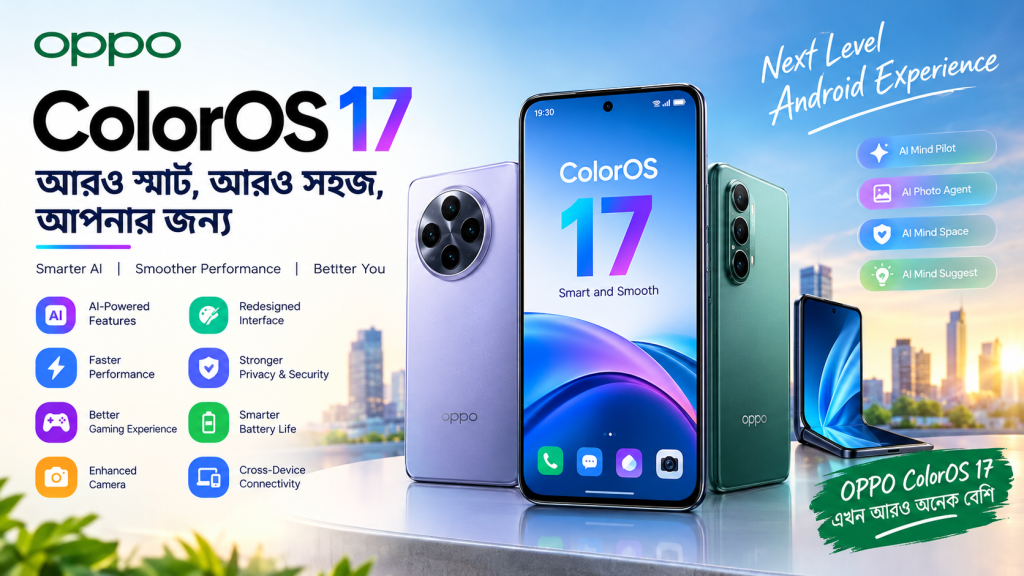
What’s New in ColorOS 17?
ColorOS 17 focuses on three major improvements:
- AI-powered productivity
- Ultra-smooth performance
- Better personalization
Unlike previous updates that mainly refined existing features, ColorOS 17 introduces system-wide AI capable of helping users organize files, edit photos, summarize information, and perform everyday tasks more efficiently.
Redesigned Living Flow Interface
One of the first things users notice after updating is the completely refreshed visual experience.
ColorOS 17 introduces Living Flow Design, making every interaction feel more fluid.
Highlights include:
- Smoother app transitions
- Dynamic animations
- Refined icons
- Responsive touch effects
- More immersive lock screen
- Improved notification animations
- Better multitasking visuals
The interface feels modern without being overwhelming.
Faster Performance with the New Rendering Engine
Performance has always been a strong point of ColorOS.
With ColorOS 17, OPPO introduces a new rendering architecture that significantly improves responsiveness.
Benefits include:
- Faster app launches
- Smoother scrolling
- Reduced frame drops
- Better multitasking
- Lower RAM usage
- Improved battery efficiency
Even after years of usage, OPPO claims ColorOS 17 maintains over 90% of its original smoothness under long-term testing.
AI Features That Actually Save Time
Artificial intelligence is now deeply integrated throughout the operating system.
Instead of simply generating text or images, ColorOS 17 helps users complete real-world tasks.
AI Mind Pilot
AI Mind Pilot can:
- Organize files automatically
- Search photos intelligently
- Create travel plans
- Summarize information
- Understand natural language commands
It works like a smart assistant built directly into the operating system.
AI Photo Agent
Photo editing has become much easier.
Users can:
- Match editing styles from reference images
- Adjust colors automatically
- Improve portraits
- Remove distractions
- Apply natural edits using text prompts
Instead of learning complicated editing software, users simply describe the changes they want.
AI Mind Space
Think of this as your personal digital memory.
It stores:
- Notes
- Screenshots
- Documents
- Videos
- Web links
- Travel plans
Then it automatically organizes everything into searchable collections.
AI Mind Suggest
ColorOS 17 can proactively provide useful information, including:
- Flight reminders
- Train schedules
- Morning briefings
- Music suggestions
- Travel updates
The goal is reducing the number of apps users need to open.
Better Privacy and Security
Privacy receives significant attention in ColorOS 17.
New additions include:
- End-to-end encrypted AI processing
- Private Computing Cloud
- Transparency Report
- AI Call Guard
- Enhanced fraud detection
- Improved protection against AI-generated scam calls
These features help users understand how their data is processed while improving security.
Gaming Performance
Gamers benefit from several improvements:
- Better thermal management
- Stable frame rates
- Faster touch response
- Improved GPU optimization
- Reduced background interference
- Faster game loading
Competitive games feel noticeably smoother, especially during long gaming sessions.
Battery Optimization
ColorOS 17 intelligently manages background apps.
Advantages include:
- Longer standby time
- Lower idle battery drain
- Smarter charging optimization
- Better resource allocation
- More efficient AI processing
Users should notice improved battery life without sacrificing performance.
Camera Experience
Although camera hardware varies by device, ColorOS 17 enhances photography through software.
Features include:
- Smarter AI image processing
- Faster HDR
- Better portrait enhancement
- Improved night photography
- AI object recognition
- Intelligent editing suggestions
These updates help users capture better images with less manual adjustment.
Multitasking Improvements
Power users will appreciate:
- Faster split-screen switching
- Better floating windows
- More background apps retained
- Improved gesture navigation
- Smoother transitions between applications
Multitasking feels significantly more polished.
Cross-Device Connectivity
ColorOS continues expanding its ecosystem.
Users can expect easier integration with compatible OPPO devices, including tablets and PCs, for file sharing, continuity, and screen collaboration. Availability may vary by region and device.
Expected Supported OPPO Devices
Rollout typically begins with flagship models before expanding.
Expected eligible devices include:
Find Series
- OPPO Find X10 Series
- Find X9 Series
- Find N foldables
Reno Series
- Reno 14
- Reno 13
- Reno 12 (selected regions)
A Series
Some newer A Series devices are also expected to receive the update depending on hardware compatibility.
Official eligibility varies by market.
ColorOS 17 Pros
- Beautiful new interface
- Excellent animations
- Powerful AI tools
- Faster overall performance
- Better battery optimization
- Strong privacy protection
- Smarter multitasking
- Improved gaming experience
ColorOS 17 Cons
- Some AI features may be region-dependent.
- Rollout timing differs by device and country.
- Older hardware may not support every new feature.
Should You Upgrade?
If your OPPO smartphone is eligible, the answer is yes.
ColorOS 17 delivers meaningful improvements rather than cosmetic changes. The combination of smoother performance, practical AI features, stronger privacy, and refined design makes it one of OPPO’s most complete software updates to date.
Whether you’re a gamer, student, content creator, or business professional, the update offers tangible benefits for everyday use.
Frequently Asked Questions
Is ColorOS 17 based on Android 17?
Yes. ColorOS 17 is OPPO’s latest Android-based operating system built on the newest Android platform.
Which phones will receive ColorOS 17 first?
The rollout starts with the Find X10 Series before expanding to additional supported OPPO devices.
Does ColorOS 17 improve battery life?
Yes. Improved resource scheduling and smarter background management help extend battery life in many everyday scenarios.
Are the AI features available on every device?
Not necessarily. Some AI features require newer hardware or may be limited by region and rollout stage.
Final Verdict
ColorOS 17 represents one of OPPO’s biggest software upgrades in recent years. Instead of adding AI as a gimmick, OPPO has woven intelligent features throughout the operating system while simultaneously improving speed, security, multitasking, and visual design.
For users looking for a modern Android experience that feels polished, responsive, and genuinely useful, ColorOS 17 sets a strong benchmark for 2026.