What’s New in iOS 27.2? Features, Siri AI, Photos Updates and More
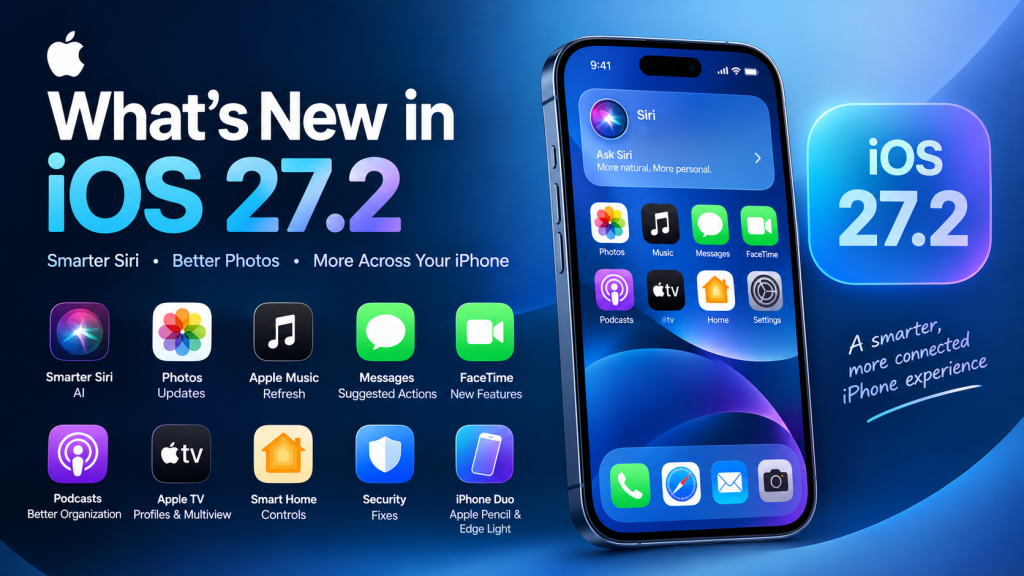
Apple’s iOS 27.2 update arrived on October 26, 2026, bringing new Siri AI capabilities, improvements to Apple Music and Photos, changes to FaceTime and Podcasts, and several useful updates across the iPhone experience. Rather than introducing an entirely new operating system, this release builds on iOS 27 with features designed to make everyday tasks easier, expand AI capabilities, and improve security.
In this guide, you’ll discover what’s new in iOS 27.2, which features are worth trying first, which iPhones are compatible with its AI features, and how to install the update safely.
Introduction: What Is New in iOS 27.2?
The iOS 27.2 update is an important follow-up to Apple’s iOS 27 release. Its most noticeable improvements focus on Siri AI, content discovery, communication, entertainment, and photo management.
For users who rely on their iPhones for work, study, photography, messaging, or streaming, these smaller changes can make the operating system more useful in everyday situations.
According to published release coverage, the key additions include:
- More language options for Siri AI.
- The ability for Siri AI to recall previous conversations.
- Better access to information from supported apps and personal content.
- Improved organization of podcast episodes.
- New Photos features for Shared Albums.
- Dual Capture support for Group FaceTime.
- Apple TV profiles and other entertainment improvements.
- Security updates and interface refinements.
One important distinction: some features require newer iPhone models or Apple Intelligence support, so not every iPhone user will receive every capability.
1. Smarter Siri AI With Conversation Memory
One of the biggest highlights of iOS 27.2 is the expansion of Siri AI. Instead of treating every interaction as an isolated question, the updated assistant can recall previous conversations and use information from more supported sources.
What can the updated Siri AI do?
The key improvements include:
- Recall previous conversations: Ask follow-up questions about information Siri shared with you earlier.
- Access more personal context: Siri can use relevant information from sources such as Messages attachments, Calendar event attendees, voicemails, Safari history, and Reading List.
- Control app access: The Excluded Apps setting lets supported Siri, Search, and suggestion features avoid accessing selected apps.
- Select specific text: Choose and copy just the portion of a Siri response you need instead of copying the entire answer.
These capabilities are intended for supported devices, including all iPhone 16 models and later and the iPhone 15 Pro and iPhone 15 Pro Max. Availability also depends on regional and language restrictions.
Practical example
Imagine you asked Siri for restaurant suggestions last week. You may now be able to ask a follow-up about those recommendations rather than explaining the entire request again.
For someone managing appointments, reading lists, and messages throughout the day, this type of conversational continuity could make Siri more useful.
However, these capabilities do not mean Siri can freely access every app or understand every detail on your phone. Supported integrations, settings, language, and device compatibility still matter.
2. Siri AI Supports Five Additional Languages
Another significant change is expanded language support. iOS 27.2 adds Siri AI support for:
- French
- Japanese
- Korean
- Portuguese
- Spanish
This expansion makes Apple’s AI features more accessible to users who prefer languages other than English.
For example, a Spanish-speaking user may be able to interact with supported Siri AI capabilities in Spanish, while a Japanese-speaking user may benefit from the new language option.
What about Bengali?
Bengali is not included in the five newly announced Siri AI languages listed for iOS 27.2. Users in Bangladesh should check the language and regional options available on their particular iPhone before expecting the new AI features to work in Bengali.
It is also important to distinguish general Siri language support from availability of the newer Siri AI capabilities. They are not necessarily the same.
3. Apple Photos Gets Better Shared Album Tools
The Photos app receives useful improvements for people who share pictures with friends, relatives, or colleagues.
iOS 27.2 adds several changes to Shared Albums:
- Edit photo and video captions.
- Edit comments.
- Avoid adding duplicate photos.
- Receive reminders before eligible albums expire, giving participants time to save important content.
These features are documented in release coverage published after the update became available.
Why these changes matter
Consider a family sharing holiday photos. Someone might upload the same picture twice, add an incorrect caption, or forget to save pictures before an album expires.
The new tools help address these everyday problems.
The ability to edit captions and comments is especially useful when shared albums are used to organize school events, weddings, family gatherings, or travel memories.
AI-generated image identification
iOS 27.2 also adds support for SynthID watermarking to help identify images generated or modified using generative tools in Photos and Image Playground.
SynthID is designed to embed an unobtrusive digital marker in supported AI-generated or AI-modified content. It is not the same as placing a visible logo across a picture.
This feature can help with image provenance, but it should not be treated as a universal detector that can identify every AI-generated image.
4. Apple Music Gets a Visual Refresh
Apple Music also receives a visual refresh in iOS 27.2.
Reported changes include a new black-and-white app icon, blue interface accents in place of the previous red highlights, and refreshed Music widgets with darker backgrounds.
What changes for users?
The updated appearance gives Apple Music a different visual identity while keeping the app focused on music discovery and playback.
If you use Apple Music every day, you may notice the redesigned icon and interface accents first.
However, this update should not be confused with a complete redesign of the music-streaming experience. The reported changes primarily concern branding and interface presentation rather than a fundamentally different way to listen to music.
5. Messages Adds Contextual Suggested Actions
Messages becomes more useful for turning conversations into tasks.
The iOS 27.2 update brings back Suggested Actions, which can display relevant shortcuts based on the context of a conversation. Examples include creating a Calendar event or a reminder from a discussion about plans.
Example: Planning a meeting
Suppose a friend messages you:
“Let’s meet on Friday at 4 PM.”
Depending on the available context and recognized details, Messages may offer a shortcut to create a calendar event or reminder.
Instead of manually switching between apps and entering every detail, you can use a suggested action when it appears.
This could be helpful for:
- Scheduling meetings.
- Remembering appointments.
- Organizing family events.
- Tracking plans discussed in conversations.
Suggestions are not guaranteed to appear for every message. Their availability depends on the content and supported system functionality.
Users who prefer fewer contextual suggestions should also review the available suggestion controls in Settings.
6. Apple Podcasts Improves Episode Organization
For podcast listeners, iOS 27.2 introduces a more organized Home tab.
The Podcasts app separates content into two dedicated sections:
- New Episodes: Recent episodes from shows you follow.
- Continue Playing: Episodes you have already started and can resume.
Episode lists also use backgrounds that match the colors of podcast artwork.
Why is this useful?
Imagine you follow several podcasts but listen to them irregularly. Previously, finding a new episode could mean navigating around episodes you had already started.
The separate sections make it easier to distinguish fresh content from unfinished listening sessions.
This improvement is particularly useful for people who listen to educational podcasts, technology news, interviews, or long-form discussions while commuting or exercising.
7. Apple TV App Adds Profiles on iPhone
The Apple TV app on iPhone gains profile support, allowing different household members to maintain more separate viewing experiences.
Each supported profile can have its own viewing history and recommendations.
How profiles help
Consider a household in which several people use the same Apple TV account environment.
One person may watch documentaries, another may prefer children’s entertainment, and someone else may follow sports. Separate profiles help keep recommendations more relevant to individual interests.
This is a welcome quality-of-life change for people who watch content on their iPhones as well as other Apple devices.
Multiview for sports fans
Release coverage also reports Multiview support in the iPhone TV app, allowing eligible users to watch up to four live sports streams simultaneously. Availability depends on supported content, services, and region.
Sports fans should check which streams and subscriptions are available in their country before relying on this feature.
8. FaceTime Gets New Communication Features
iOS 27.2 improves FaceTime with changes aimed at group communication and accessibility.
Dual Capture for Group FaceTime
Dual Capture lets a supported iPhone use its front and rear cameras simultaneously, allowing participants to see both the person making the call and the view of what they are showing.
With iOS 27.2, this capability expands to Group FaceTime. The feature requires an iPhone 17 or later, and participants need to be running iOS 27 or later.
This could be useful when demonstrating a product, showing a classroom project, or sharing something happening in front of you without completely losing your own camera view.
Sign language interpreters and live captioners
FaceTime also supports adding a third-party sign language interpreter or live captioner to a call. 9to5Mac+1
This addition can help make conversations more accessible to participants who need communication assistance.
The exact experience will depend on the supported service and setup used by the participants.
9. iPhone Duo Gets Apple Pencil Support and Edge Light
Some iOS 27.2 features are designed specifically for Apple’s iPhone Duo.
Apple Pencil (USB-C) support
The iPhone Duo gains support for Apple Pencil (USB-C), enabling stylus input on the compatible device. Apple Pencil Pro and other Pencil models are not supported for this feature, according to the release coverage.
For users who prefer writing or drawing by hand, stylus support can make compatible tasks more convenient.
Potential uses include:
- Annotating documents.
- Making handwritten notes.
- Sketching ideas.
- Marking up supported content.
Edge Light for video calls
Another iPhone Duo feature is Edge Light, which illuminates the user’s face by creating a ring-light effect around the display during calls.
This may be useful when joining video calls in a dim room without carrying a separate light.
These features are model-specific and should not be expected on every iPhone updated to iOS 27.2.
10. Smart Home Controls Become More Convenient
The Home app receives additional controls for compatible smart locks.
The update introduces options called Lock After Closing and Door Left Open. These can allow a supported lock to lock automatically after a door closes or notify users if the door remains open too long.
A practical example
If your home has a compatible smart lock, you may be able to configure an automatic locking behavior rather than relying entirely on memory.
A door-left-open notification can also help you notice when a door has not been closed properly.
These features require compatible hardware and supported configurations. They are not universal upgrades for every traditional or smart lock.
11. More Improvements Across iOS 27.2
Beyond the major features, the update includes smaller changes that may improve the daily iPhone experience.
| Feature | What’s new |
|---|---|
| Games app | The Friends tab provides more context for friend suggestions and recent games played. |
| Clock app | Small interface refinements include smaller a.m. and p.m. labels. |
| Call Context | Anniversary information is added to the supported on-screen information shown during business calls. |
| HomePod | Lock Controls can help prevent unwanted touches from starting audio when compatible updated devices are used. |
| Security | The update includes security fixes affecting multiple system components and apps. |
These additions may not transform the iPhone on their own, but together they show that iOS 27.2 is intended to refine the broader experience rather than focus on one headline feature.
12. iOS 27.2 Security Updates: Why You Should Care
Security updates are an important reason to keep your iPhone software current.
Apple’s iOS 27.2 release includes fixes for issues affecting components such as Mail, Safari, Apple Intelligence, and the Neural Engine.
Security patches can help protect a device against software vulnerabilities. Installing them is especially important if you use your phone for banking, email, work accounts, personal documents, or sensitive communications.
Should you install iOS 27.2 for security alone?
For most users whose iPhones support the update, installing the latest stable version is a sensible step.
Before updating, back up your device and make sure you have enough free storage and battery power.
The exact list of security fixes should be checked against Apple’s official security documentation rather than relying on a third-party feature summary.
13. Which iPhones Support iOS 27.2?
The release is available to compatible iPhones, but individual features have different hardware requirements.
For example, the published Siri AI requirements include all iPhone 16 models and later, plus the iPhone 15 Pro and iPhone 15 Pro Max. Dual Capture for Group FaceTime has a separate requirement of iPhone 17 or later.
Use the following table as a starting point, not as a complete compatibility list.
| Feature | Compatibility note |
|---|---|
| Core iOS 27.2 update | Requires an iPhone supported by iOS 27. |
| Siri AI improvements | iPhone 16 models and later; iPhone 15 Pro and Pro Max, subject to availability restrictions. |
| Group FaceTime Dual Capture | iPhone 17 or later, with supported software on participants’ devices. |
| Apple Pencil support | iPhone Duo only, with Apple Pencil (USB-C). |
| Smart lock controls | Compatible smart-lock hardware and supported configurations required. |
Important: Confirm the exact supported iPhone models and regional availability through Apple’s official documentation before publishing a definitive compatibility list. Not every feature is available on every device, in every country, or in every language.
14. How to Download and Install iOS 27.2
Updating your iPhone is straightforward. Follow these steps to check for the stable release.
Step 1: Open Settings
Unlock your iPhone and open the Settings app.
Step 2: Select General
Scroll through Settings and tap General to open the system options.
Step 3: Open Software Update
Tap Software Update and allow the phone to check for available updates.
Step 4: Download and install
If iOS 27.2 is offered, review the update information and choose the installation option.
Step 5: Check your new features
After the phone restarts, check Siri, Photos, Messages, Podcasts, and other relevant apps.
Apple’s published instructions identify Settings → General → Software Update as the route to install iOS 27.2.
Before you update
- Back up important data using iCloud or a computer.
- Connect to a reliable Wi-Fi network.
- Ensure your battery is sufficiently charged or connect your phone to power.
- Make sure you have enough available storage.
- Use the stable public release rather than a developer beta unless you specifically need beta software.
If the update does not appear, check your device compatibility, available storage, and internet connection.
15. Should You Update to iOS 27.2?
For most users with compatible iPhones, iOS 27.2 is worth considering because it combines useful app improvements with security fixes.
Your reasons for updating may differ depending on how you use your phone.
| User type | Why the update may matter |
|---|---|
| Everyday iPhone users | General refinements and security fixes |
| AI enthusiasts | Expanded Siri AI capabilities and language support |
| Photography fans | Shared Album editing and AI-image identification support |
| Students and professionals | Contextual Messages suggestions and Siri improvements |
| Podcast listeners | Easier separation of new and unfinished episodes |
| Sports fans | Supported Multiview viewing options |
| Accessibility users | Additional FaceTime interpreter and captioner support |
The most significant improvements are likely to be Siri AI’s expanded capabilities, the Photos changes, and the refinements to communication and entertainment apps. If you use an older supported iPhone, you may still benefit from the general update even if certain advanced AI or camera features are unavailable.
16. What About the Redesigned Health App?
One detail worth clarifying is the redesigned Health app that appeared in earlier iOS 27.2 beta builds.
That redesign was removed before the public release. Reporting indicates that Apple still plans to introduce the updated Health experience later, but it is not a feature users should expect to receive as part of the released iOS 27.2 build. AndroidPure+1
This is an important reminder that beta features can change or disappear before the final software reaches users.
If you saw an article claiming that iOS 27.2 includes the complete redesigned Health app, check whether the article describes an early beta or the final public release.
17. iOS 27.2 vs. iOS 27: What’s the Difference?
iOS 27 introduced the broader operating-system experience, including the initial Siri AI rollout. iOS 27.2 builds on that foundation with additional features and refinements.
| Area | iOS 27 | iOS 27.2 |
|---|---|---|
| Siri AI | Introduced in the iOS 27 generation | Conversation recall, expanded context, additional languages and controls |
| Photos | Earlier Photos and Shared Albums improvements | Caption and comment editing, duplicate-photo prevention and expiration reminders |
| Messages | Existing messaging experience | Contextual Suggested Actions |
| Podcasts | Existing episode browsing | Separate New Episodes and Continue Playing sections |
| Apple TV | Existing iPhone app | Profile support and reported Multiview improvements |
| FaceTime | Dual Capture introduced for supported use | Dual Capture expanded to Group FaceTime and additional accessibility options |
| Security | Initial system security protections | Additional security fixes |
The main difference is not a completely new design. It is the expansion of capabilities already introduced in iOS 27, with additional practical features across supported apps.
Frequently Asked Questions (FAQs)
1. What is new in iOS 27.2?
iOS 27.2 adds Siri AI improvements, support for five additional Siri AI languages, Photos Shared Album tools, Messages Suggested Actions, updated Apple Music styling, podcast organization improvements, Apple TV profiles, and FaceTime enhancements. It also includes security fixes. 9to5Mac+1
2. When was iOS 27.2 released?
Apple released iOS 27.2 on October 26, 2026.
3. Which iPhones support iOS 27.2?
The update is intended for iPhones supported by iOS 27. However, feature availability varies. Siri AI and Dual Capture, for example, have specific hardware requirements. Check Apple’s compatibility information for your exact model.
4. Does iOS 27.2 improve Siri?
Yes. Supported devices gain conversation recall, access to more personal context, additional app-access controls, granular text selection, and five additional Siri AI languages.
5. Does iOS 27.2 support Bengali Siri AI?
Bengali is not among the five additional Siri AI languages listed for this release. Check Apple’s language availability information for any later changes.
6. Does iOS 27.2 improve the Photos app?
Yes. Shared Albums gain editable captions and comments, duplicate-photo prevention, and reminders before eligible albums expire. The update also adds SynthID watermarking support for identifying certain AI-generated or AI-modified images.
7. Does iOS 27.2 include the redesigned Health app?
No. The redesigned Health app seen in earlier beta builds was removed before the public release. It has been reported as a future update rather than a feature included in the final iOS 27.2 release.
8. Will iOS 27.2 drain my iPhone battery?
Battery life varies by device, battery health, settings, and usage. Temporary battery or performance changes can occur after an update while the phone completes background tasks. There is not enough evidence to claim that every iPhone will experience improved or reduced battery life.
9. How do I install iOS 27.2?
Open Settings → General → Software Update. If the update is available for your device, follow the on-screen instructions to download and install it.
10. Is iOS 27.2 worth installing?
For most users with compatible iPhones, yes. The combination of security fixes, Siri AI improvements, and practical app enhancements makes it a worthwhile update to consider.
Conclusion: Is iOS 27.2 a Meaningful Update?
iOS 27.2 is a refinement-focused release that makes Apple’s software more capable in several everyday situations. Siri AI gains better conversational continuity and broader language support, Photos becomes more useful for shared memories, Messages offers contextual shortcuts, and Podcasts and Apple TV improve content organization.
The update also includes accessibility enhancements, selected smart-home improvements, and security fixes.
Not every feature will be available on every iPhone, and some of the most advanced additions depend on specific hardware, supported languages, or regional availability. Nevertheless, users with compatible devices have several good reasons to explore the update.
Our recommendation: Back up your iPhone, check the available update under Settings → General → Software Update, and install iOS 27.2 if it is offered for your device. Start with the features you use most, and consult Apple’s official release and security notes for model-specific details.